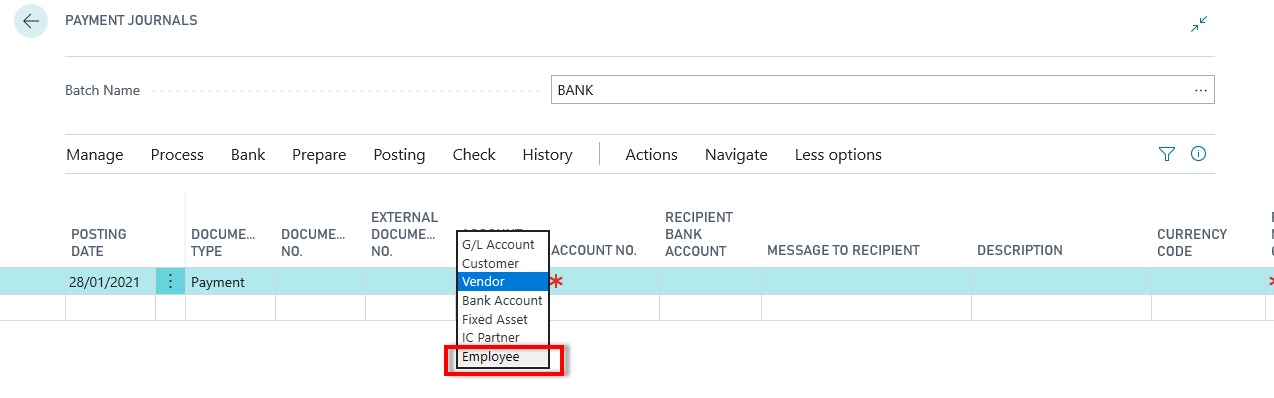
While business central getting updated every day ,today found that new account type has been introduced in journals as ‘Employee‘. Wherein you can select employee from master to make transactions and after post it will maintain separate ledger as employee ledger
Following new tables introduced for setup and ledger entries
This cumulative update includes all hotfixes and regulatory features that have been released for Microsoft Dynamics 365 Business Central, including hotfixes and regulatory features that were released in previous cumulative updates.
This cumulative update replaces previously released cumulative updates. You should always install the latest cumulative update.
This cumulative update includes all hotfixes and regulatory features that have been released for Microsoft Dynamics 365 Business Central, including hotfixes and regulatory features that were released in previous cumulative updates.
This cumulative update replaces previously released cumulative updates. You should always install the latest cumulative update.
Here are steps to upgrade to Business central .This is old way that is merging the objects into standard objects . Anyway not recommended to do this and it is better to create extension and publish it
Listed here some of the steps to upgrade business central from NAV 2018
Merge all customization of old database to business central on-premises. Merging can be done using PowerShell(recommended) or manually (not recommend)
Rectify all the errors and keep the object ready for upgrade.
Take full SQL backup of old database.
Install the Business Central from DVD.
Uninstall allthe existing extensions from old database.
Upload business central partner license into the old database.
Delete all object except tables from old database.
Clear all server instance and debugger breakpoints records from the old database.
Make sure user with whom upgrade is carried out should have privileges of DB_Owner in Sql.
Open business central development environment as an Administrator.
Open the old database in Business central, which will ask for convert.
Skip the schema synchronization at this point of upgrade.
Import the upgraded objects on converted database in business central with selection of Replace All.
Skip the schema synchronization at this point of upgrade.
Import appropriate upgrade code unit from product DVD.
Connect new database to appropriate NAV service.
Increase SQL command time out to maximum number.
Compile all objects with schema synchronization.
Execute data upgrade process and import permission set.
Make pages searchable by using ‘Build object search Index’ option from developer environment.
Remove all unwanted objects
Get Ready to face customer queries from new database
NAV TechDays is the name of a conference, organized by mibuso.com. This conference meant technical only and highly relevant – sessions, related NAV and Business Central.
NAV TechDays is the place where some of the best developers and MVP’s exchange ideas and provides more insight of NAV world (oops Business Central)
Few of the session which I think more useful for everybody which listed here on my blog and you can visit them
Practical approaches for upgrading your NAV database and moving to extensions
The future for developers and consultants
Performance: Business Central reloaded for the Cloud
What’s new in Developing for Business Central
Evolution of a titan: a look at the development of NAV from an MVP angle
Business Central: The new face of the client
Crazy mix of integrations: Dynamics 365 Business Central and Azure services
Now today when I am checking in Business client this problem has been solved and now we no need to press F5 to refresh the page and it automatically switch the controls based on conditions or visibility property set. This changes will surely help me in app development which I am working on.
This cumulative update includes all hotfixes and regulatory features that have been released for Microsoft Dynamics 365 Business Central, including hotfixes and regulatory features that were released in previous cumulative updates.
This cumulative update replaces previously released cumulative updates. You should always install the latest cumulative update.











 Ammolh Saallvi Blog