🚀 Copilot and AL Development: Transforming the Future of Business Central Engineering

The world of Business Central development is evolving rapidly—and one of the most powerful accelerators in recent years is Copilot. With AI deeply integrated into the Microsoft ecosystem, developers building extensions with AL now have an intelligent partner that speeds up development, enhances accuracy, and improves productivity.

🧠 What Is Copilot in Business Central?

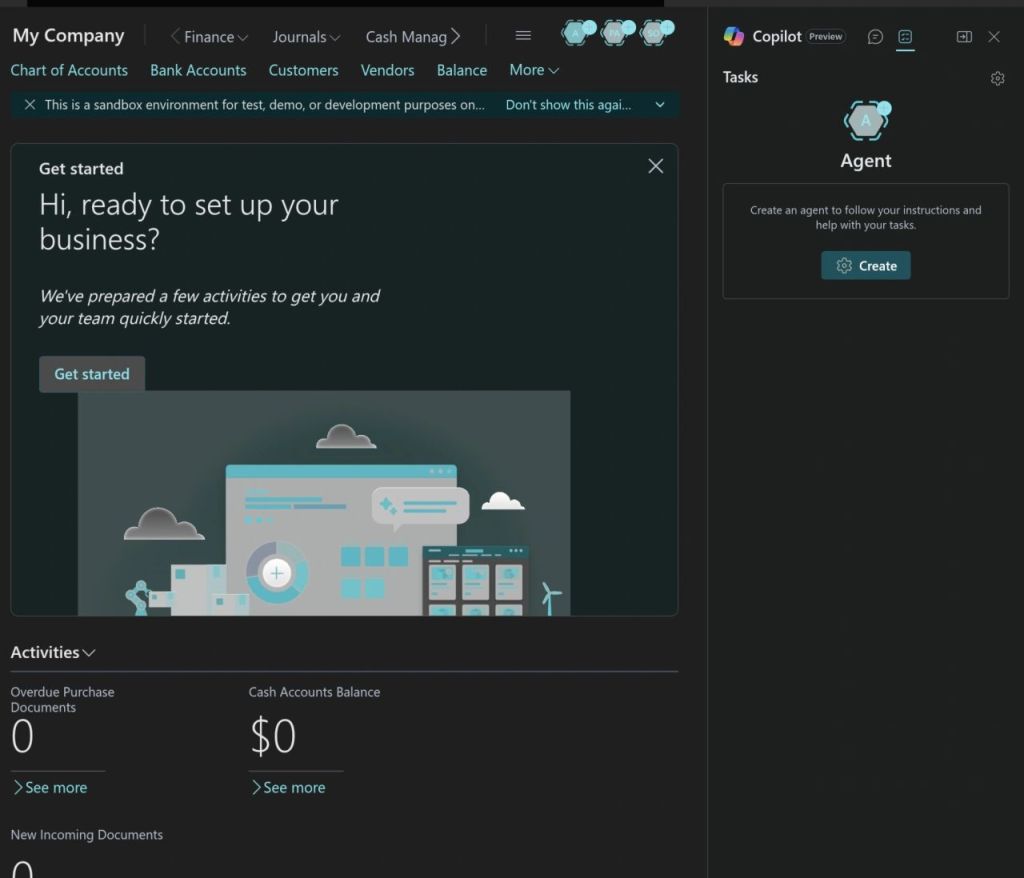
Copilot is Microsoft’s AI-powered assistant designed to help developers, consultants, and end-users across Dynamics 365. For Business Central development, Copilot works in multiple ways:

  • Suggesting AL code in VS Code
  • Generating complete extension structures (tables, pages, APIs, codeunits)
  • Helping analyze and explain existing AL code
  • Creating documentation and comments automatically
  • Supporting AI-enabled scenarios inside BC

It acts like a smart co-developer—always ready, always fast.

💻 Copilot Inside AL Development (VS Code Integration)

To leverage Copilot for AL development, developers use the GitHub Copilot extension in Visual Studio Code. This integration enables:

✔ Instant AL Code Generation

Developers can write a comment or a simple description, and Copilot generates the AL code structure automatically.

Example:

// Create a sales quote scheduler job that sends reminders 

Copilot produces the full codeunit, job logic, and scheduling pattern.

✔ Faster Page & Table Extensions

Copilot instantly creates field additions, actions, triggers, and layouts without manual typing.

✔ API & Permission Set Generation

Perfect for rapid prototyping.

🤖 Using AI Inside AL Extensions

You can integrate AI into your custom extensions using Copilot-enabled system codeunits or external AI services.

Example: A simple AI-driven item description generator:

codeunit 50100 "Item AI Description"
{
    procedure Generate(ItemRec: Record Item): Text
    var
        Copilot: Codeunit "Copilot System";
    begin
        exit(
            Copilot.GenerateText(
                'Create a professional marketing description for item: ' + ItemRec.Description
            )
        );
    end;
} 

This allows users to generate product descriptions instantly saving hours of manual work.

⚡ How Copilot Improves AL Developer Productivity

🟦 1. Rapid Coding

Copilot reduces 60–70% of repetitive development effort.

🟦 2. Fewer Syntax Errors

Copilot understands AL structures and suggests correct patterns.

🟦 3. Code Understanding

It can analyze and explain legacy AL code—very useful during upgrades from NAV to BC.

🟦 4. Documentation

Automatically generates comments and XML documentation.

🟦 5. Code Quality

Copilot suggests modern patterns like interfaces, single-responsibility design, and event-driven architecture.

🚨 Limitations—What Developers Should Know

Despite its strengths, Copilot is not perfect:

  • It may generate outdated syntax or patterns.
  • It cannot validate AL compiler rules.
  • It sometimes repeats code blocks unnecessarily.
  • Developers must always review and refactor generated output.

Copilot is a booster, not a replacement for AL expertise.

Copilot is not just a trend—it’s a game changer for Business Central developers. It speeds up AL development, supports learning, and enhances overall code quality. By embracing Copilot, organizations can deliver extensions faster, reduce development cost, and empower developers to focus on business logic rather than repetitive tasks.

The future of Business Central development is AI-assisted, and Copilot is leading the way.

Stay Tuned for more…

Boosting Performance in Business Central with SetAutoCalcFields

In today’s fast-paced business environments, performance optimization is not a luxury — it’s a necessity. Whether you’re building custom reports, extending pages, or writing integration APIs in Microsoft Dynamics 365 Business Central, slow operations can frustrate users and strain resources.

One simple but powerful technique to improve performance is using the SetAutoCalcFields method.

Why FlowFields Matter for Performance

In Business Central, FlowFields are virtual fields calculated on the fly, not stored physically in the database. Examples include:

  • Inventory on Item
  • Balance on Customer

When you retrieve a record, FlowFields are not calculated automatically unless you explicitly call CalcFields().

Manually calculating FlowFields for every record during loops, leading to multiple SQL queries — one for each record — causing heavy load and slower performance.

SetAutoCalcFields solves this by batch-calculating FlowFields along with the record fetch.
Instead of running one query per record, it combines the calculation in a single optimized query.

Imagine fetching 1,000 customers and displaying their balances without SetAutoCalcfields:

CustomerRec.FindSet();
repeat
    CustomerRec.CalcFields(CustomerRec.Balance); // Triggers a DB call every time!
    DisplayBalance(CustomerRec."No.", CustomerRec.Balance);
until CustomerRec.Next() = 0;

Result:
  • 1 SQL query to get Customers
  • + 1,000 SQL queries for Balances

With SetAutoCalcFields:

CustomerRec.SetAutoCalcFields(CustomerRec.Balance);
CustomerRec.FindSet();
repeat
    DisplayBalance(CustomerRec."No.", CustomerRec.Balance);
until CustomerRec.Next() = 0;

Result:
  • 1 SQL query to get Customers and Balances together

Benefits of Using SetAutoCalcFields

  • Improved Page Load Times: By deferring calculations, pages with numerous records and calculated fields will load significantly faster.
  • Faster Report Generation: Reports that rely on calculated fields will be generated more quickly as the calculations are performed only when the field’s value is actually needed for display or processing.
  • Reduced Database Load: Fewer automatic calculations translate to fewer database queries, reducing the overall load on your Business Central database.
  • Enhanced User Experience: Snappier performance leads to a more responsive and enjoyable user experience.

Best Practices for Performance Gains

To maximize the benefits of SetAutoCalcFields:

  • Only specify necessary FlowFields:
    Don’t auto-calculate every FlowField — focus on what your process needs.
  • Use it before data retrieval:
    Call SetAutoCalcFields before FindSet(), FindFirst(), or FindLast()
  • Avoid unnecessary recalculations:
    Once FlowFields are set to auto-calculate, do not manually call CalcFields() again for the same fields.
  • Monitor heavy FlowFields:
    Some FlowFields (e.g., Inventory) involve complex sums across tables — only auto-calculate when really needed.
  • Profile your code:
    Use Performance Profiler to measure improvements.

Using SetAutoCalcFields properly can lead to dramatic performance improvements in Business Central.
By reducing SQL traffic, simplifying code, and batch-fetching FlowFields intelligently, you can create faster, cleaner, and more scalable applications.

A small change in your coding habits can create a big impact for your users.

Hope this will help..

File.ViewFromStream in AL: Display Text Directly from Stream

Microsoft Dynamics 365 Business Central 2025 Wave 1 continues to improve its developer experience with handy new features. One of the exciting additions in this release is the File.ViewFromStream method — a simple yet powerful function that enhances how developers interact with files stored in memory.

In the current versions of Business Central, when you need to view an attached document, a report output, or an incoming file, the typical process involves downloading the file first and then opening it with an external application. This can be time-consuming, especially when dealing with multiple files or when you simply need a quick glance at the content. Switching between applications disrupts your workflow and can feel inefficient.

📘 What is File.ViewFromStream?

The new method File.ViewFromStream(Stream: InStream,Text[,Boolean]) enables developers to open or preview a file directly from a stream, without having to save it to a temporary physical file.

This is a major convenience when working with files generated on the fly — such as PDFs, Excel files, or text reports — especially in scenarios where users just need to view or download the file rather than save it on the server.

Syntax

[Ok := ]  File.ViewFromStream(InStream: InStream, FileName: Text [, AllowDownloadAndPrint: Boolean])

🛠 Example:

procedure ShowGeneratedReport()
var
    TempBlob: Codeunit "Temp Blob";
    OutStream: OutStream;
    InStream: InStream;
    ReportContent: Text;
begin
    ReportContent := 'Hello from AL!' + Format(CurrentDateTime) + '\nThis is a preview of your text report.';

    TempBlob.CreateOutStream(OutStream);
    OutStream.WriteText(ReportContent);

    TempBlob.CreateInStream(InStream);
    File.ViewFromStream(InStream, 'ReportPreview.txt', true);
end;

💼 Use Cases

Here are some scenarios where ViewFromStream can be a game-changer:

  • Previewing customer invoices or sales reports generated on-demand.
  • Opening files attached in workflow approvals.
  • On-the-fly document generation in extensions or apps.

The File.ViewFromStream method offers a powerful and user-friendly way to present stream content directly within Dynamics 365 Business Central. The File.ViewFromStream method is a lightweight, client-friendly way to present text content on the fly in Business Central.

Stay tuned for more.

Production Order Cancellations: Reversing Consumption in Business Central V26

Production orders are the backbone of manufacturing operations, but sometimes, plans change. Orders need to be cancelled, and when those orders have already consumed materials, things can get tricky. Business Central V26 has stepped in to simplify this process, offering a more streamlined way to reverse consumption and cancel production orders. Let’s explore how this works.

Imagine you’ve started a production order, materials have been consumed, and then, for whatever reason, the order needs to be scrapped. In previous versions of Business Central, simply deleting the order wasn’t an option. The system needed a way to accurately reverse the consumption entries to maintain inventory and financial integrity. This often involved manual adjustments and could be a time-consuming, error-prone process.

Business Central V26: Simplifying the Reversal:

Enter the “Reverse Production Order Transaction” action in Business Central V26. This feature provides a more efficient and accurate way to undo consumption and output transactions, making production order cancellations less of a headache.

How it Works:

  • Reversing Item Ledger Entries:
    • When you use the “Reverse Production Order Transaction” action, Business Central generates reversing item journal lines.
    • These lines effectively negate the original consumption entries, returning the materials to inventory.
  • Handling Output and Capacity:
    • The system also reverses output and capacity entries, including quantities, scrap, setup time, and run time.
    • This ensures that all related ledger entries are accurately adjusted.
  • Accurate Ledger Updates:
    • The system applies these reversals to the original ledger entries, maintaining precise inventory and cost records.

After reversal of production order you can finish production order without output. To achieve this you need to enable the setup on Manufacturing setup

Activate the Finish Order Without Output toggle in the Manufacturing Setup page.

Business Central V26’s enhanced capabilities for reversing production order transactions represent a significant step forward in simplifying production management. By automating the reversal process, manufacturers can save time, reduce errors, and maintain accurate inventory and financial records. This feature is a valuable addition to the Business Central , making production order cancellations less of a burden and more of a seamless operation.

Stay tuned for more updates.

Introduction of ‘Continue’ in Business Central v26

The Dynamics 365 Business Central ecosystem is in a state of continuous evolution, with each release bringing enhancements that empower developers and refine business processes. With the advent of version 26 (2025 release wave 1), a particularly noteworthy addition to the AL programming language is the continue statement. While seemingly a minor syntactic change, its implications for code efficiency and clarity are substantial.

A Refined Approach to Loop Control

In the realm of business application development, loops are indispensable. They facilitate iterative data processing, automation of repetitive tasks, and the implementation of complex algorithms. However, traditional loop structures often necessitate convoluted conditional logic to bypass specific iterations, leading to code that is both verbose and difficult to maintain.

The introduction of continue addresses this challenge directly. By providing a concise mechanism to skip the remaining code within a loop’s current iteration and proceed to the next, it promotes a more streamlined and readable coding style.

Benefits for Business Central Developers

  • Enhanced Code Readability: The continue statement reduces the reliance on nested IF statements, resulting in cleaner and more maintainable code. This is particularly crucial in large-scale Business Central implementations where code clarity is paramount.
  • Improved Performance: By bypassing unnecessary code execution, continue contributes to optimized loop performance. This is especially relevant when processing large datasets or executing computationally intensive operations.
  • Modernization of AL: The inclusion of continue aligns AL with contemporary programming paradigms, enhancing its usability for developers accustomed to other languages. It signifies changes to evolving AL into a more robust and versatile development platform.
  • Increased Development Flexibility: The ability to finely control loop execution grants developers increased flexibility when coding. This allows for more complex and efficient algorithms to be developed.

Where Can You Use ‘Continue’?

The continue statement is your ally within various loop structures in AL:

  • for loops: Ideal for iterating a specific number of times.
  • while loops: Perfect for looping until a condition is met.
  • repeat...until loops: Useful for executing a block of code at least once.
  • foreach loops: Designed for iterating through collections.

A Case in Point

Consider a scenario where a developer needs to process a batch of sales orders, excluding those with specific characteristics. Without continue, the code might involve nested IF statements to filter out unwanted orders. However, with continue, the logic becomes significantly more concise:

local procedure ProcessSalesOrders(SalesOrderRecord: Record "Sales Header")
begin
    SalesOrderRecord.Reset();
    SalesOrderRecord.FindSet();

    repeat
        if SalesOrderRecord."Order Type" = SalesOrderRecord."Order Type"::Quote then
            continue; // Skip quotes
        end;

        // Process the remaining sales order logic here
        // ...
    until SalesOrderRecord.Next() = 0;
end;

This example illustrates the power of continue in simplifying loop logic and enhancing code clarity.

Stay tuned for more.

What is planned for Business Central Wave 1 2024 release

As we are gearing up for new release of business central and already the buzz is started for new version. Here listing few upcoming features which I am looking forward in new version.

Copilot and AI innovation

One of the hot topics in market and lot of new features are revolved around this innovation such as

Introduce Power Automate Copilot integration with Business Central

Create sales lines easily with Copilot

Create product information faster with Copilot

Complete bank account reconciliation faster with Copilot

Map e-documents to purchase order lines with Copilot

Learn more about fields with Copilot

Development

This time less features planned for development side but are important

Debug the system application : This will help us to understand the code flow while debugging the application.

Remove friction when working with external app dependencies :- With this feature MS will make it possible to download the symbols from AppSource applications so we no need to depend on publisher of app.

User experiences

Use drag and drop to attach multiple files

Use actions to navigate and highlight or fix platform-generated errors

Share error details to get help from another user

There are more and more rich features planned for this release please keep an eye on

What’s new and planned for Dynamics 365 Business Central

Stay tuned for more….