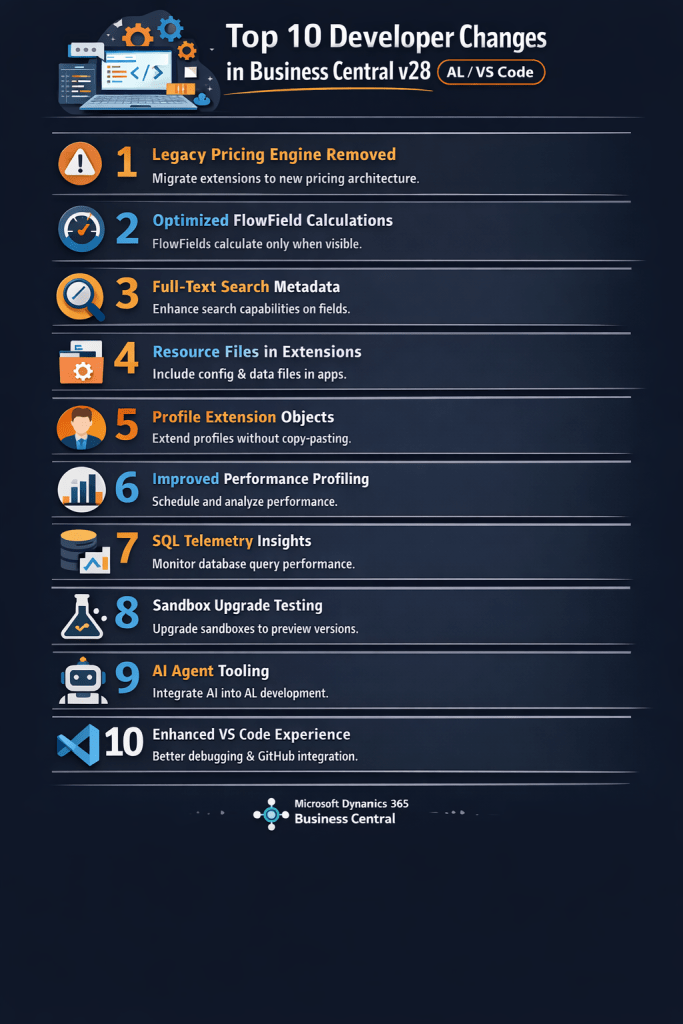
Top 10 Developer Changes in Business Central v28 (AL / VS Code)

Every major release of Microsoft Dynamics 365 Business Central introduces improvements that impact how developers design, build, and maintain extensions.

Version 28 (2026 Release Wave 1) focuses strongly on performance optimization, platform modernization, and improved developer productivity.

For developers building extensions using AL and Visual Studio Code, several changes require attention during upgrades.

In this article, I will walk through the Top 10 developer changes in Business Central v28 and what they mean for your extensions.

1. Legacy Pricing Engine Removed

One of the biggest platform changes in v28 is the complete removal of the legacy pricing engine.

Microsoft introduced the new Price List architecture in earlier versions, and now it becomes the only supported pricing model.

Developer Impact

Extensions relying on older pricing logic must migrate.

Areas to review include:

  • custom price calculations
  • discount logic
  • pricing-related code units
  • integrations referencing legacy pricing tables

The new pricing system provides a more flexible framework for managing pricing rules and discounts.

2. FlowField Calculation Optimization

Business Central v28 introduces an important optimization for FlowField calculations.

Previously, FlowFields could be calculated even if they were not visible on the page.

In v28, FlowFields are calculated only when the field is visible in the UI.

Benefits

  • fewer SQL queries
  • faster page loading
  • improved scalability for large datasets

3. Improved Search Metadata

Search and navigation are significantly improved in v28.

Developers can now provide better search metadata that improves how users discover pages, actions, and data.

Why this matters

In large Business Central environments with hundreds of pages and reports, improved search helps users locate functionality much faster.

Developers should review:

  • page captions
  • action captions
  • field descriptions

Clear naming improves search results and usability.

4. Resource Files in Extensions

Another useful improvement in v28 is the ability to include resource files within extensions.

These files can store:

  • configuration data
  • templates
  • initialization data

Benefits

Developers can package configuration data directly with the extension instead of writing complex installation code.

This simplifies deployment and improves maintainability.

5. Profile Extension Objects

Customizing user profiles previously required copying base profiles, which created upgrade issues.

Business Central v28 introduces profile extension objects, allowing developers to extend profiles without duplication.

Advantages

  • cleaner customization model
  • easier upgrades
  • better maintainability

Developers can now modify Role Centers and user experiences in a more structured way.

6. Improved Performance Profiling

Performance troubleshooting becomes easier with new profiling improvements.

Developers can capture performance data to analyze:

  • long-running AL procedures
  • page load times
  • inefficient database queries

Why this matters

In large implementations with many extensions, performance bottlenecks can be difficult to detect.

Profiling tools help developers identify inefficient code earlier.

7. SQL Telemetry Insights

Business Central v28 provides better telemetry insights for database operations.

Telemetry data includes:

  • SQL query execution time
  • table interactions
  • query performance statistics

This information integrates with Microsoft Azure Application Insights.

Developer Advantage

Developers can monitor real production workloads and optimize extensions based on actual usage patterns.

8. Sandbox Upgrade Testing Improvements

Upgrade testing is easier in v28.

Developers can now upgrade existing sandbox environments to preview versions.

Benefits

  • test extension compatibility earlier
  • simulate production upgrades
  • reduce upgrade risks

This is particularly important for partners maintaining multiple customer environments.


9. AI Agent Development Scenarios

Microsoft continues to move toward AI-assisted development workflows.

New tools and integrations enable AI agents to assist developers in tasks such as:

  • analyzing AL code
  • generating documentation
  • improving developer productivity

This aligns with Microsoft’s broader AI strategy across the Dynamics ecosystem.


10. Enhanced VS Code Development Experience

The development experience in Visual Studio Code continues to improve.

Enhancements include:

  • better debugging capabilities
  • improved symbol downloads
  • smoother Git integration
  • improved navigation in large AL projects

These improvements help developers manage complex extension projects more efficiently.


What Developers Should Prepare for in v28

Before upgrading to Business Central v28, developers should review their extensions carefully.

Key areas to validate include:

  • pricing logic compatibility
  • FlowField calculations
  • performance-sensitive code
  • search metadata
  • extension initialization processes

Testing extensions in sandbox environments before production upgrades is strongly recommended.

Business Central v28 continues Microsoft’s focus on modernizing the platform and improving developer productivity.

The most significant changes for developers include:

  • removal of legacy pricing logic
  • optimized FlowField calculations
  • improved telemetry and profiling tools
  • better development workflows in Visual Studio Code

Stay tune for more..
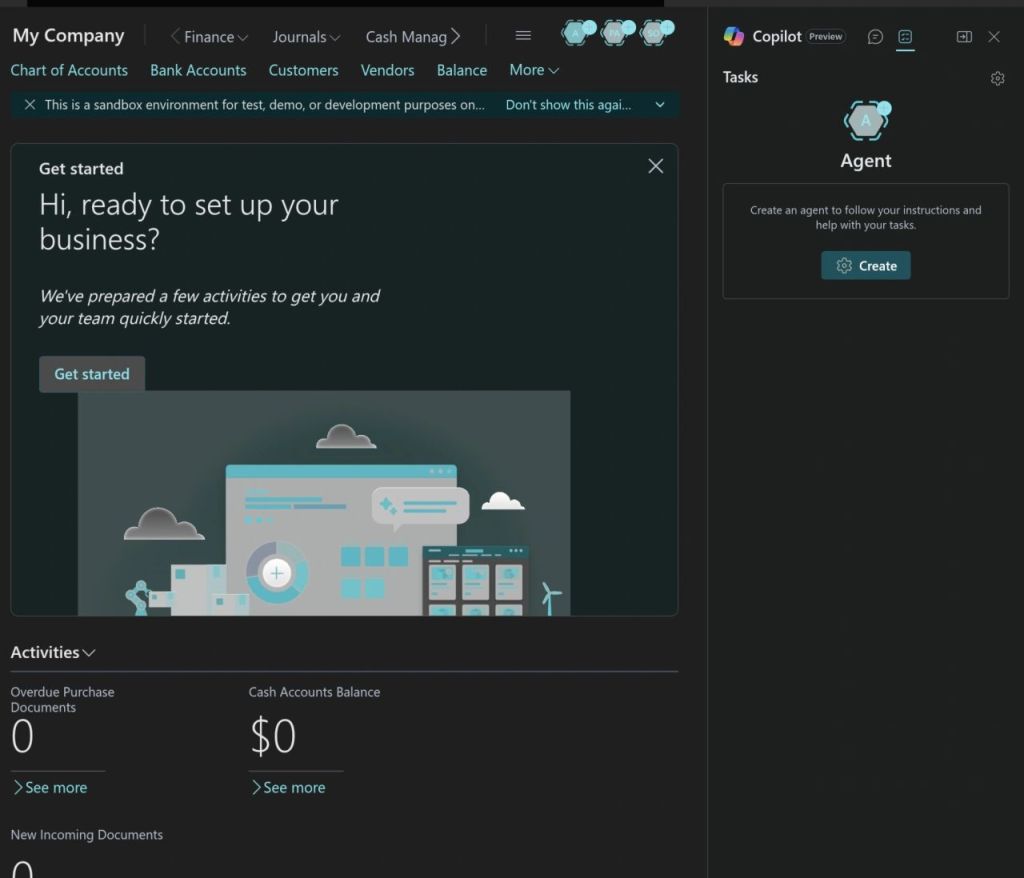
How to Create and Use AI Agents in Microsoft Dynamics 365 Business Central

Artificial Intelligence is rapidly expanding inside enterprise systems. With Microsoft Dynamics 365 Business Central v27.4, Microsoft now exposes a first-class agent creation capability — allowing you to define, configure, and run intelligent agents directly inside your ERP environment.

In this blog, we’ll walk through how agents work, the creation experience based on what’s available in the product today.

🚀 What Are AI Agents in Business Central?

In Business Central, AI agents are software assistants that can:

  • Understand natural language instructions
  • Execute business tasks against Business Central data
  • Follow configured rules and permissions
  • Operate autonomously or with human review

These agents sit at a higher abstraction layer than traditional workflows — they interpret intent and then coordinate actions across standard Business Central APIs, pages, and logic.

🛠 Step-by-Step: Creating an Agent in Business Central

Here’s a distilled implementation walk-through based on the video and documentation:

1. Enable Agent Capabilities

Before you can create agents, you must:

  • Enable Custom Agent capability in your Business Central environment
  • Have a sandbox tenant for experimentation
  • Ensure you have relevant permission sets such as AGENT-ADMIN and AGENT-DIAGNOSTICS applied to your user account

2. Start the Agent Wizard

Once enabled:

  1. Click the “Agent” icon in the role centre
  2. Choose Create New Agent
  3. Select a template (e.g., Sales Validation) or start from scratch
  4. Provide:

The installer guides you through setting up:

  • Purpose
  • Profile
  • Permissions

Agents are treated like users, so they must have clear permissions defining what Business Central data they can access and act on.

3. Define Agent Instructions

This is the heart of the agent. Instructions are plain-language “task definitions” that guide what the agent should do when triggered.

A basic instruction structure looks like:

  • Introductory purpose
  • Step-by-step tasks
  • Expected output or result

Example :

“You are a Business Central agent. When invoked, check all overdue receivables and create a work list of customers where the balance exceeds credit terms.”

Agents use this instruction to orchestrate actions, call APIs, or run logic — all while respecting security.

4. Configure Execution Profile

Each agent runs under a specific profile:

  • Choose standard or custom roles used in Business Central
  • Profiles determine UI access and actions available to the agent
  • Permissions are tied to the profile

Profiles limit what the agent can read or write — essential for governance.

5. Test and Activate

Once configured:

  1. Use the Agent Task Playground to simulate tasks
  2. Review output and refine instructions
  3. When ready, activate the agent
  4. The agent can run immediately or wait for a trigger

In preview today, scheduling and automated triggers are limited — most agents are started manually or via designated events.

📍 Real Business Examples

Agents being highlighted in Business Central include:

🔹 Sales Order Agent

  • Monitors a designated email inbox
  • Parses incoming customer requests
  • Locates or creates the customer record
  • Verifies item availability
  • Generates and sends quotes or orders via email
  • Keeps the human reviewer in the loop for approvals and changes

This helps sales teams minimize manual order entry by automating standard order processing tasks.


🔹 Payables & AP Agents

Similar to sales agents, agents can automate Accounts Payable workflows by:

  • Monitoring invoice email inboxes
  • Extracting invoice data using AI
  • Drafting vendor invoices inside Business Central
  • Letting users review and finalize postings

This frees AP teams from repetitive data entry and improves efficiency.

AI agents in Microsoft Dynamics 365 Business Central are more than an experiment — they’re a new paradigm for embedding intelligence inside operational ERP processes. Rather than writing bespoke automation, you define business intent, and the system interprets and operationalizes it — provided you set the rules, permissions, and expectations correctly.

From Experimentation to Enterprise Architecture: Reflections from AgentCon Bangkok 2026

I recently attended AgentCon Bangkok 2026, and one theme was unmistakable: AI agents are transitioning from experimental prototypes to enterprise-grade systems.

The narrative has shifted.

It is no longer about building impressive demos. It is about designing structured, governed, production-ready agent architectures that can operate inside real business systems.

1. The Evolution of AI Agents

In earlier stages, most AI implementations focused on:

  • Prompt engineering
  • Single-agent task execution
  • Standalone copilots

At AgentCon, the conversation was centered on:

Multi-Agent Architectures

Planner–Executor–Validator models are becoming standard design patterns. Instead of a single LLM handling everything, responsibilities are separated:

  • Planner agent defines tasks
  • Executor agent performs tool calls or API interactions
  • Validator agent enforces constraints and accuracy

This improves determinism, auditability, and risk control.

2. Tool-Calling Is the Real Differentiator

What makes agents enterprise-ready is not the language model itself — it is structured tool integration.

In ERP ecosystems like Microsoft Dynamics 365 Business Central, value emerges when agents:

  • Call APIs securely
  • Read structured financial data
  • Trigger workflows
  • Generate reports with contextual awareness

The LLM becomes a reasoning layer, while the ERP remains the system of record.

This separation is critical.

3. Practical Enterprise Applications

Beyond experimentation, AI agents are beginning to demonstrate measurable operational value across industries:

Configuration & Compliance Audits

Agents that scan enterprise configurations, policy settings, and control structures — identifying inconsistencies and generating structured compliance reports.

Automated Documentation & Knowledge Systems

Agents that analyze system metadata, logs, or workflows to generate accurate, up-to-date documentation and operational guides.

AI-Assisted Development & Code Review

Agents embedded into IDEs to:

  • Review code quality
  • Validate security standards
  • Detect performance bottlenecks
  • Enforce architectural guidelines

Intelligent Workflow Orchestration

Agents embedded within operational processes to:

  • Provide contextual recommendations
  • Validate transactions before execution
  • Surface risk indicators in real time
  • Assist decision-makers without bypassing control layers

The emphasis is augmentation — not blind automation.

4. The Real Question

The future is not about replacing users.

It is about designing human-in-the-loop systems where:

  • Agents reason
  • Humans approve
  • Systems enforce

The architectural discipline behind these systems will determine whether AI becomes operational infrastructure — or remains a demo tool.

Final Thoughts

AgentCon reinforced a clear conclusion:

AI capability is accelerating. Enterprise readiness depends on architecture.

Organizations that invest in governance models, tool integration frameworks, and structured orchestration will lead the next phase of AI adoption.

If you are building production-grade agent systems inside enterprise environments, this is the moment to think beyond prompts — and design for scale.

🚀 Copilot and AL Development: Transforming the Future of Business Central Engineering

The world of Business Central development is evolving rapidly—and one of the most powerful accelerators in recent years is Copilot. With AI deeply integrated into the Microsoft ecosystem, developers building extensions with AL now have an intelligent partner that speeds up development, enhances accuracy, and improves productivity.

🧠 What Is Copilot in Business Central?

Copilot is Microsoft’s AI-powered assistant designed to help developers, consultants, and end-users across Dynamics 365. For Business Central development, Copilot works in multiple ways:

  • Suggesting AL code in VS Code
  • Generating complete extension structures (tables, pages, APIs, codeunits)
  • Helping analyze and explain existing AL code
  • Creating documentation and comments automatically
  • Supporting AI-enabled scenarios inside BC

It acts like a smart co-developer—always ready, always fast.

💻 Copilot Inside AL Development (VS Code Integration)

To leverage Copilot for AL development, developers use the GitHub Copilot extension in Visual Studio Code. This integration enables:

✔ Instant AL Code Generation

Developers can write a comment or a simple description, and Copilot generates the AL code structure automatically.

Example:

// Create a sales quote scheduler job that sends reminders 

Copilot produces the full codeunit, job logic, and scheduling pattern.

✔ Faster Page & Table Extensions

Copilot instantly creates field additions, actions, triggers, and layouts without manual typing.

✔ API & Permission Set Generation

Perfect for rapid prototyping.

🤖 Using AI Inside AL Extensions

You can integrate AI into your custom extensions using Copilot-enabled system codeunits or external AI services.

Example: A simple AI-driven item description generator:

codeunit 50100 "Item AI Description"
{
    procedure Generate(ItemRec: Record Item): Text
    var
        Copilot: Codeunit "Copilot System";
    begin
        exit(
            Copilot.GenerateText(
                'Create a professional marketing description for item: ' + ItemRec.Description
            )
        );
    end;
} 

This allows users to generate product descriptions instantly saving hours of manual work.

⚡ How Copilot Improves AL Developer Productivity

🟦 1. Rapid Coding

Copilot reduces 60–70% of repetitive development effort.

🟦 2. Fewer Syntax Errors

Copilot understands AL structures and suggests correct patterns.

🟦 3. Code Understanding

It can analyze and explain legacy AL code—very useful during upgrades from NAV to BC.

🟦 4. Documentation

Automatically generates comments and XML documentation.

🟦 5. Code Quality

Copilot suggests modern patterns like interfaces, single-responsibility design, and event-driven architecture.

🚨 Limitations—What Developers Should Know

Despite its strengths, Copilot is not perfect:

  • It may generate outdated syntax or patterns.
  • It cannot validate AL compiler rules.
  • It sometimes repeats code blocks unnecessarily.
  • Developers must always review and refactor generated output.

Copilot is a booster, not a replacement for AL expertise.

Copilot is not just a trend—it’s a game changer for Business Central developers. It speeds up AL development, supports learning, and enhances overall code quality. By embracing Copilot, organizations can deliver extensions faster, reduce development cost, and empower developers to focus on business logic rather than repetitive tasks.

The future of Business Central development is AI-assisted, and Copilot is leading the way.

Stay Tuned for more…

What is planned for Business Central Wave 1 2024 release

As we are gearing up for new release of business central and already the buzz is started for new version. Here listing few upcoming features which I am looking forward in new version.

Copilot and AI innovation

One of the hot topics in market and lot of new features are revolved around this innovation such as

Introduce Power Automate Copilot integration with Business Central

Create sales lines easily with Copilot

Create product information faster with Copilot

Complete bank account reconciliation faster with Copilot

Map e-documents to purchase order lines with Copilot

Learn more about fields with Copilot

Development

This time less features planned for development side but are important

Debug the system application : This will help us to understand the code flow while debugging the application.

Remove friction when working with external app dependencies :- With this feature MS will make it possible to download the symbols from AppSource applications so we no need to depend on publisher of app.

User experiences

Use drag and drop to attach multiple files

Use actions to navigate and highlight or fix platform-generated errors

Share error details to get help from another user

There are more and more rich features planned for this release please keep an eye on

What’s new and planned for Dynamics 365 Business Central

Stay tuned for more….