While Directions Asia 2019 getting wrap up we have spring release of Business Central available to download
You can download from following links
Microsoft Business Central Spring 2019 Release
Lets try and blog about new features
Cheers

While Directions Asia 2019 getting wrap up we have spring release of Business Central available to download
You can download from following links
Microsoft Business Central Spring 2019 Release
Lets try and blog about new features
Cheers
While business central getting updated every day ,today found that new account type has been introduced in journals as ‘Employee‘. Wherein you can select employee from master to make transactions and after post it will maintain separate ledger as employee ledger
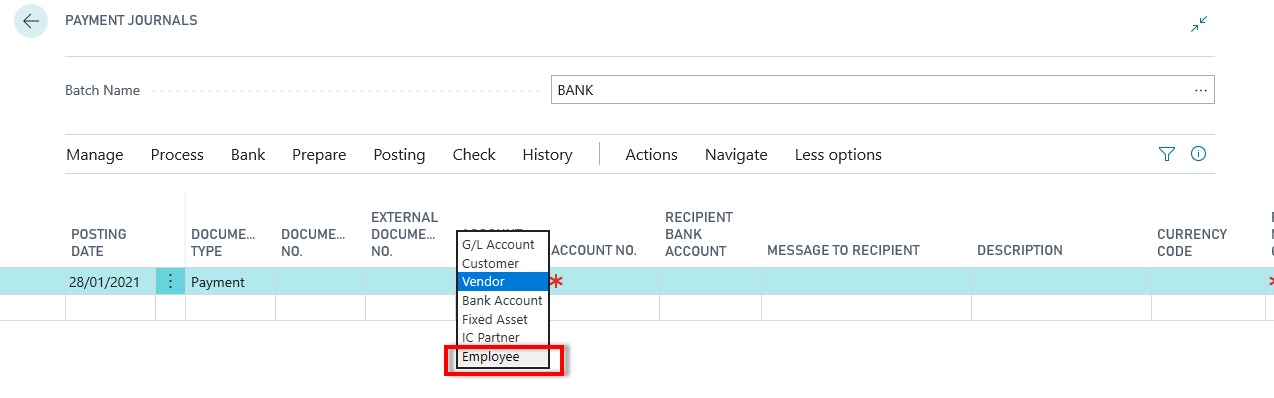
Following new tables introduced for setup and ledger entries
| ID | Name |
| 5221 | Employee Posting Group |
| 5222 | Employee Ledger Entry |
| 5223 | Detailed Employee Ledger Entry |
| 5224 | Payable Employee Ledger Entry |
| 5225 | Employee Payment Buffer |
Keep finding and keep learning.

Cumulative Update 02 for Microsoft Dynamics 365 business central on-premises released
Download from following link
Microsoft 365 Business Central :- Business Central CU02
This cumulative update includes all hotfixes and regulatory features that have been released for Microsoft Dynamics 365 Business Central, including hotfixes and regulatory features that were released in previous cumulative updates.
This cumulative update replaces previously released cumulative updates. You should always install the latest cumulative update.

Here are steps to upgrade to Business central .This is old way that is merging the objects into standard objects . Anyway not recommended to do this and it is better to create extension and publish it
Listed here some of the steps to upgrade business central from NAV 2018
Cumulative Update 01 for Microsoft Dynamics 365 business central on-premises released
Download from following link
Microsoft 365 Business Central :- Business Central CU01
This cumulative update includes all hotfixes and regulatory features that have been released for Microsoft Dynamics 365 Business Central, including hotfixes and regulatory features that were released in previous cumulative updates.
This cumulative update replaces previously released cumulative updates. You should always install the latest cumulative update.

Following are few keyboard shortcuts we can use in business central while transacting.
| General | Alt+Q | Open Tell me |
| Alt+Up | Open tooltip or validation error | |
| Tab | Move focus to the next control | |
| Shift+Tab | Move focus to the previous control | |
| Alt+Down Arrow | Open a drop-down or look up | |
| Alt+Right Arrow | See the transactions for calculated value | |
| Esc | Close the current page or drop-down. | |
| Navigate and select rows | Home/End | Go to first/last field |
| Ctrl+Home/End | Go to first/last row | |
| Ctrl+Up/Down | Navigate without losing selection | |
| Ctrl+A | Select all | |
| Ctrl+Space | Toggle row selection | |
| Ctrl/Shift+Click | Add the row/rows to the selection | |
| Ctrl+Shift+Home/End | Extend selection to first/last row | |
| Shift+Up/Down | Add row above/below to selection | |
| Shift+Page Up/Down | Add all visible rows above/below to selection | |
| Ctrl+Enter | Focus out of the list | |
| Copy and paste | Ctrl+C | Copy rows |
| Ctrl+V | Paste rows | |
| F8 | Copy field above into current row | |
| Search, filter, and sort | F3 | Toggle search |
| Shift+F3 | Toggle filter pane; focus on field filters | |
| Ctrl+Shift+F3 | Toggle filter pane; focus on totals filters | |
| Alt+F3 | Filter on selected cell value | |
| Shift+Alt+F3 | Add filter on selected field | |
| Ctrl+Alt+Shift+F3 | Reset filters | |
| Report preview | Up/Down | Scroll up and down the page |
| Right/Left | Scroll to the right/left | |
| Ctrl+Home/End | Go to the first/last page | |
| Page Up/Down | Go to the previous/next page |
Many more to come…
Hope this will help everybody
Source : Microsoft docs.
Really amazed by looking at web client of Business central and found one of the great change which was really required by my customer as it not look good when page get opens
And I am talking about the action functions available on subpage.
Till NAV 2018 it is showing directly on ribbon which is not looking good and if you have more subpages then it looks more weird.
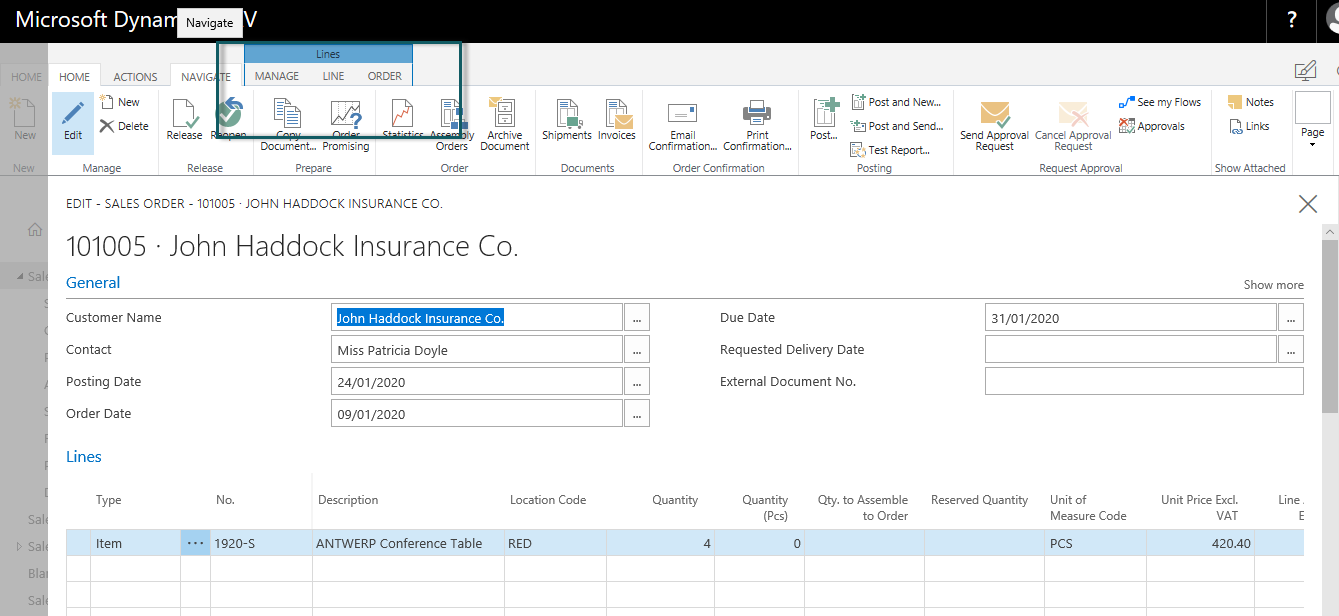
Now if you see business central web client it will show in subpage and it exactly show where it should be with nice options.
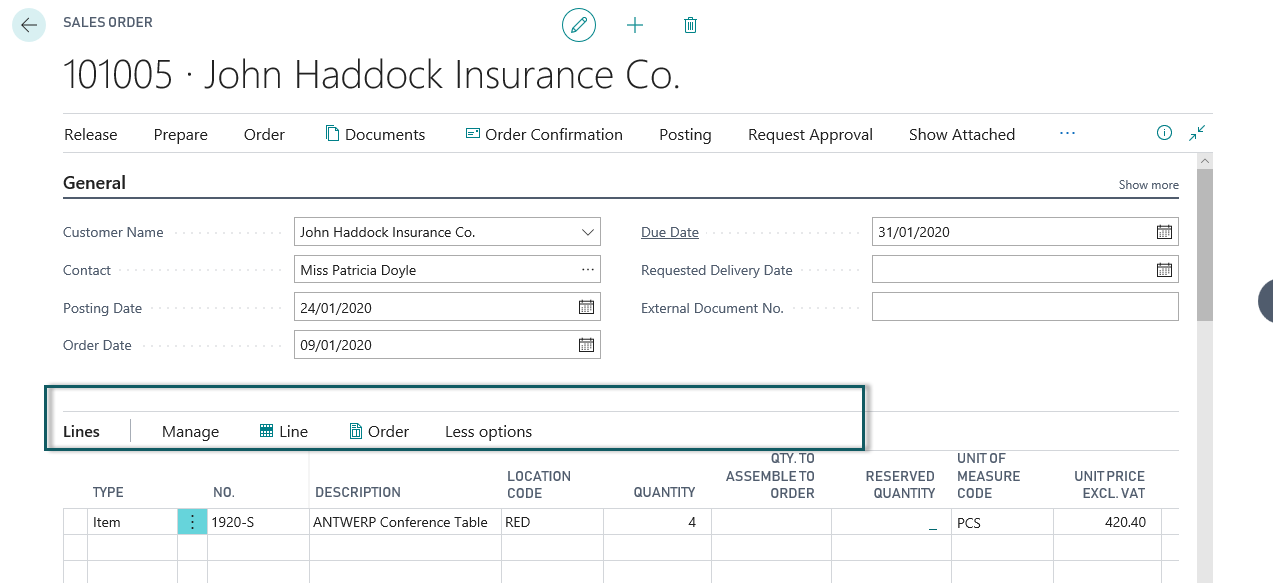
There are so many things which changed like you can go previous and next transaction from same page .no need to close page and open another transactions for view/modify..
Kudos to MS team for this change.
Will come up with more .Stay tuned .
As announced in Directions Microsoft Dynamics Business central on premises available for download from partner source.
You can download from following link
Microsoft Dynamics Business Central
Stay tuned for features and more updates.
 Ammolh Saallvi Blog