Cumulative Update Summary June 2020

Cumulative Update includes all application and platform hotfixes and regulatory features that have been released for Microsoft Dynamics NAV.

Microsoft Dynamics NAV 2018 CU 30 :- NAV2018CU30

Microsoft Dynamics NAV 2017 CU 43 :- NAV2017CU43

Microsoft Dynamics NAV 2016 CU 56 :- NAV2016CU56

Warning

Before you install a cumulative update in a production environment, take the following precautions:

  1. Test the cumulative update in a non-production environment.
  2. Make a backup of the system or computer where the cumulative update is to be installed.

Stay tuned for more updates…

Cumulative Update for Business Central Wave 1 2020

Cumulative Update includes all application and platform hotfixes and regulatory features that have been released for Microsoft Dynamics Business Central

Business Central Wave 1 2020 :- BC 16.1

Warning

Before you install a cumulative update in a production environment, take the following precautions:

  1. Test the cumulative update in a non-production environment.
  2. Make a backup of the system or computer where the cumulative update is to be installed.

Stay tuned for more updates…

Cumulative Update Summary May 2020-Business Central

Cumulative Update includes all application and platform hotfixes and regulatory features that have been released for Microsoft Dynamics Business Central

Business Central 2019 Spring Update CU 12 :- BC 14

Business Central 2019 Fall Release Wave 2 :- BC2019Wave2

Warning

Before you install a cumulative update in a production environment, take the following precautions:

  1. Test the cumulative update in a non-production environment.
  2. Make a backup of the system or computer where the cumulative update is to be installed.

Stay tuned for more updates…

Cumulative Update Summary May 2020

Cumulative Update includes all application and platform hotfixes and regulatory features that have been released for Microsoft Dynamics NAV.

Microsoft Dynamics NAV 2018 CU 29 :- NAV2018CU29

Microsoft Dynamics NAV 2017 CU 42 :- NAV2017CU42

Microsoft Dynamics NAV 2016 CU 55 :- NAV2016CU55

Warning

Before you install a cumulative update in a production environment, take the following precautions:

  1. Test the cumulative update in a non-production environment.
  2. Make a backup of the system or computer where the cumulative update is to be installed.

Stay tuned for more updates…

Cumulative Update Summary April 2020-Business Central

Cumulative Update includes all application and platform hotfixes and regulatory features that have been released for Microsoft Dynamics Business Central

Business Central 2019 Spring Update CU 11 :- BC 14

Business Central 2019 Fall Release Wave 2 :- BC2019Wave2

Warning

Before you install a cumulative update in a production environment, take the following precautions:

  1. Test the cumulative update in a non-production environment.
  2. Make a backup of the system or computer where the cumulative update is to be installed.

Stay tuned for more updates…

Cumulative Update Summary April 2020

Cumulative Update includes all application and platform hotfixes and regulatory features that have been released for Microsoft Dynamics NAV.

Microsoft Dynamics NAV 2018 CU 28 :- NAV2018CU28

Microsoft Dynamics NAV 2017 CU 41 :- NAV2017CU41

Microsoft Dynamics NAV 2016 CU 54 :- NAV2016CU54

Warning

Before you install a cumulative update in a production environment, take the following precautions:

  1. Test the cumulative update in a non-production environment.
  2. Make a backup of the system or computer where the cumulative update is to be installed.

Stay tuned for more updates…

Cumulative Update for Business Central 2019 Wave 2

Cumulative Update includes all application and platform hotfixes and regulatory features that have been released for Microsoft Dynamics Business Central 2019 Wave 2

Update 15.4 for Microsoft Dynamics 365 Business Central 2019 Release Wave 2 :- Business Central CU 15.4

Warning

Before you install a cumulative update in a production environment, take the following precautions:

  1. Test the cumulative update in a non-production environment.
  2. Make a backup of the system or computer where the cumulative update is to be installed.

Stay tuned for more updates…

Cumulative Update Summary March 2020

Cumulative Update includes all application and platform hotfixes and regulatory features that have been released for Microsoft Dynamics NAV.

Microsoft Dynamics NAV 2018 CU 27 :- NAV2018CU27

Microsoft Dynamics NAV 2017 CU 40 :- NAV 2017 CU40

Microsoft Dynamics NAV 2016 CU 53 :- NAV 2017 CU53

Warning

Before you install a cumulative update in a production environment, take the following precautions:

  1. Test the cumulative update in a non-production environment.
  2. Make a backup of the system or computer where the cumulative update is to be installed.

Stay tuned for more updates…

Cumulative Update for Business Central Wave 2

Cumulative Update includes all application and platform hotfixes and regulatory features that have been released for Microsoft Dynamics Business Central Wave 2 2019 Release

Download update from below

Update 15.3 for Microsoft Dynamics 365 Business Central 2019 Release Wave 2

Warning

Before you install a cumulative update in a production environment, take the following precautions:

  1. Test the cumulative update in a non-production environment.
  2. Make a backup of the system or computer where the cumulative update is to be installed.

Stay tuned for more updates…

How to Create Assisted Setup -Business Central

As you aware that with new version of business central comes up breaking changes which actually change the way of writing few points like assisted setup and many more.

Today we will see how to create assisted setup in wave 2 with new events. In this document have created one of the most simple assisted setup.

Step 1 :- Create New table

table 50100 "SetupTable"
{
    DataClassification = CustomerContent;

    fields
    {
        field(1; GroupCode; Code[10])
        {
            DataClassification = CustomerContent;

        }
        Field(2; "Group Description"; text[100])
        {
            DataClassification = CustomerContent;
        }
    }

    keys
    {
        key(PK1; GroupCode)
        {
            Clustered = true;
        }
    }


}

2. Create New page

page 50100 "SetupPage"
{
    PageType = ListPart;
    SourceTable = SetupTable;
    layout
    {
        area(content)
        {
            repeater(SetupGroup)
            {
                field(GroupCode; GroupCode)
                {
                    ApplicationArea = All;
                    ToolTip = 'Select the specified group code';
                }
                field("Group Description"; "Group Description")
                {
                    ApplicationArea = All;
                    ToolTip = 'Specifies a description.';
                }
            }
        }
    }
}

Step 3 :- Now use new assisted setup module to create assisted setup as below

codeunit 50100 "SetupTableAssistedSetup"
{

    var
        AssistedSetup: Codeunit "Assisted Setup";
        AssistedSetupGroup: Enum "Assisted Setup Group";
        CurrentGlobalLanguage: Integer;
        SetupWizardTxt: Label 'Set up Table';
        SetupWizardLinkTxt: Label 'https://google.com', Locked = true;

        AlreadySetUpQst: Label 'Setup is already set up. To change settings for it, go to the setup again.Do you want go there now ?';

    [EventSubscriber(ObjectType::Codeunit, Codeunit::"Assisted Setup", 'OnRegister', '', false, false)]
    local procedure SetupInitialize()

    begin
        CurrentGlobalLanguage := GlobalLanguage();
        AssistedSetup.Add(GetAppId(), PAGE::SetupPage, SetupWizardTxt, AssistedSetupGroup::Extensions, '', SetupWizardLinkTxt);
        GLOBALLANGUAGE(1033);
        AssistedSetup.AddTranslation(GetAppId(), PAGE::SetupPage, 1033, SetupWizardTxt);
        GLOBALLANGUAGE(CurrentGlobalLanguage);
        GetInformationSetupStatus();
    end;

    [EventSubscriber(ObjectType::Codeunit, Codeunit::"Assisted Setup", 'OnReRunOfCompletedSetup', '', false, false)]
    local procedure OnReRunOfCompletedSetup(ExtensionId: Guid; PageID: Integer; var Handled: Boolean)
    begin
        if ExtensionId <> GetAppId() then
            exit;
        case PageID of
            Page::"Assisted Company Setup Wizard":
                begin
                    if Confirm(AlreadySetUpQst, true) then
                        Page.Run(PAGE::SetupPage);
                    Handled := true;
                end;
        end;
    end;

    local procedure GetAppId(): Guid
    var
        Info: ModuleInfo;
        EmptyGuid: Guid;
    begin
        if Info.Id() = EmptyGuid then
            NavApp.GetCurrentModuleInfo(Info);
        exit(Info.Id());
    end;


    local procedure GetInformationSetupStatus()
    var
        SetupTab: Record SetupTable;
    begin
        SetupTab.SetFilter(GroupCode, '<>%1', '');
        If SetupTab.IsEmpty() then
            exit;
        AssistedSetup.Complete(GetAppId(), Page::SetupPage);

    end;
}


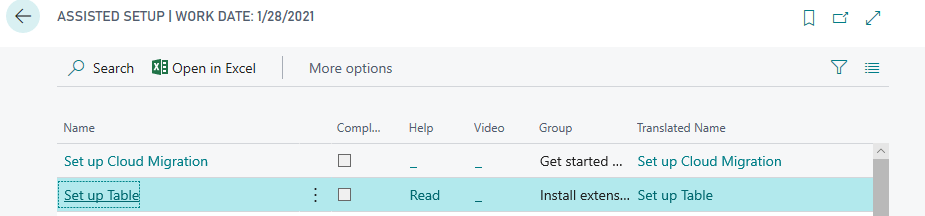
Publish the extension and you will see following result.

Hope this will help you….