Use of implicit ‘with’ will be removed in the future :-Business Central

Though above warning was informed by MS long time back but it has introduced in latest version of AL.

With the update of new version of AL extension this warning is populated in AL code.

Once you update above AL language version then you will find below warning

Now this warning will become error in near future that means we need to correct it anyhow . If your app contain more than 100 pages then it will be too much efforts to make it manually and tedious task.

To make it superfast work we have one extension available in marketplace which will help you to resolve it within seconds.

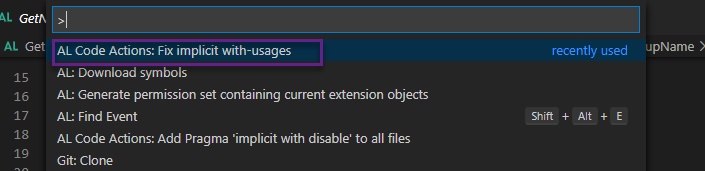
Once you install the extension then Press ‘F1’ and run following command

‘Fix Implicit with usages’

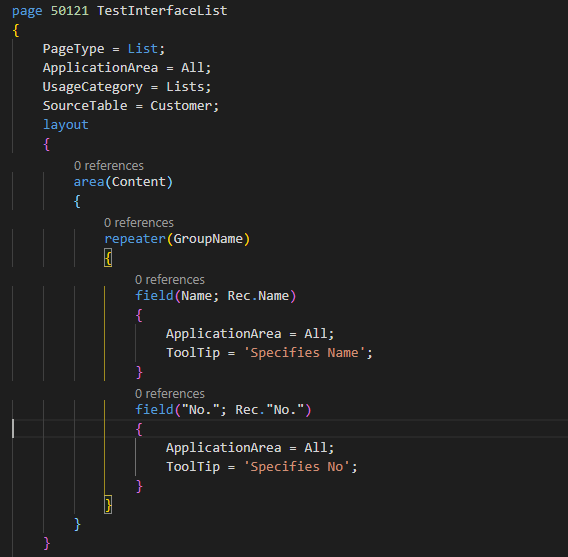
Just have look at the following file

Now run above command and relax as it will fix the warning in all pages.
Result of the file after running command
It will fix the all warning in all the files.

Hope this will help you

Stay tuned for more update

The ID Range ‘[50000..99999] is not valid : Business Central

Today morning I update AL extension with the latest version as below

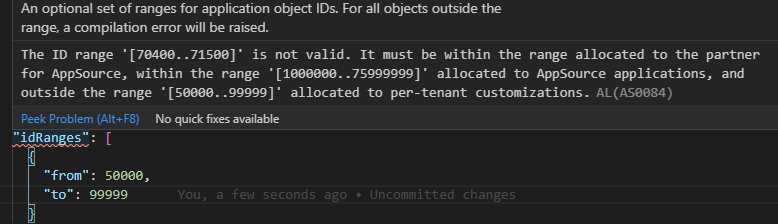
After update I found following issue for Per Tenant app and was not able to find any clue for this issue

To resolve the issue decided to roll back to latest update and it works fine but it is not giving the latest updates for AL

Then I decided to ask our beloved community

MVP https://twitter.com/ajkauffmann gave the solution to resolve this

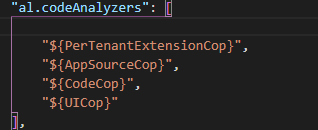
Actually I was doing mistake in App Source Analyzer that I enabled both AppsourceCop and PerTenantExtensionCop for PerTenant App which was not correct

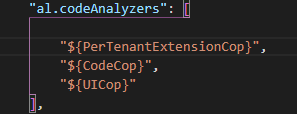
This is actually not correct because we need enable code analyzer like

If developing App within Certified App range (70M) then enable AppsoureCop and if developing app for Tenant then enable PerTenantExtensionCop.

This resolve my issue.

Hope this will help you..

You can go through the twitter thread.

Cumulative Update for Business Central September 2020

Cumulative Update includes all application and platform hotfixes and regulatory features that have been released for Microsoft Dynamics Business Central

MS Dynamics Business Central 2020 Wave 1 (BC16) :- CU 16.5

MS Dynamics 365 Business Central 2019 Release Wave 2(15.10) :- CU 15.10

Business Central Spring Release (BC16) :- CU16

Warning

Before you install a cumulative update in a production environment, take the following precautions:

  1. Test the cumulative update in a non-production environment.
  2. Make a backup of the system or computer where the cumulative update is to be installed.

Stay tuned for more updates…

How to build Multiline Instruction in Business Central

Few days back one of my customer ask me can you display text in bulleted format on page.

Today I will show how I achieved this with very simple way.

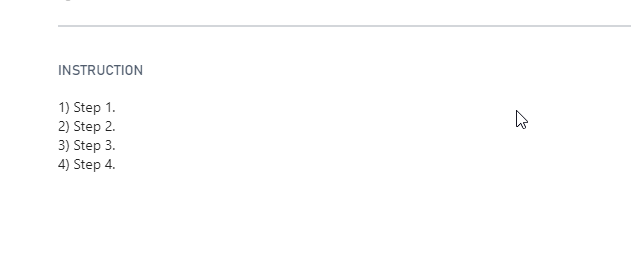
Created one page as follows with one field to display instruction in multiline format

On the field set the multiline property to true.

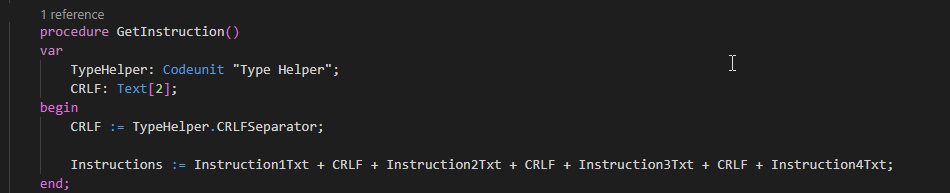
To display to instruction on bullet format created instruction variable as follows

If we concatenate the instruction then it will display in single line so we need to break the line .To break the line used following code unit Type helper.

Lets see the result after publishing

Hope this will help you.

Stay tuned for more.

How to Create Custom Event in Business Central

Looking at the subject there are lot of blogs available but I am writing this based on one of the request from my colleague.

Everybody aware of that whenever you developed an app it need to be extensible and if anybody would like to add or modify any field or additional routing we need to have events which can extend the base functionality.

Step 1 :- Simple Quick action to add event in Business Central

Next step will be we can subscribe the event and add you own code.

It is so simple to add custom event in AL and allow other to extend your functionality.

Hope this will help you.

Stay tuned for more updates.

How to create Custom Notification in Business Central

This blog post I am writing based on request of one of the follower.

Even though notification is not new business central world but today we will see how we will write custom notification and get notified for certain validations.

To create notifications I added following simple scenario that when my page get opened it should show some notification.

Lets see how we can do this.

To generate this notification I have used customer list page and subscribe on OnOpenPageEvent to execute my notification.

In this notification whenever page will get open it will show notification and whenever user click on Contact Us it will redirect to my blog.

Once this piece of code is published and as soon as customer list page opens you will see the result of notification as below

Hope this will help you.

Stay tuned for more..

How to convert long code into Procedure in AL/Business Central.

With the different code actions it is very easy to convert your long code into procedures. Just a small tip to convert to your long code into smaller procedures.

To enable to code actions

Hope this will help you.

Stay tuned for more.

Cumulative Update for Business Central July 2020

Cumulative Update includes all application and platform hotfixes and regulatory features that have been released for Microsoft Dynamics Business Central

MS Dynamics Business Central 2020 Wave 1 (BC16) :- CU 16.3

MS Dynamics 365 Business Central 2019 Release Wave 2(15.8) :- CU 15.8

Business Central Spring Release (BC14) :- CU14

Warning

Before you install a cumulative update in a production environment, take the following precautions:

  1. Test the cumulative update in a non-production environment.
  2. Make a backup of the system or computer where the cumulative update is to be installed.

Stay tuned for more updates…

How to find Table Relation in Business Central.

With the release of business central new property is introduced to find the table relation of given field. This property is called as’ Relation’ which returns integer value

Lets see how we can find that .

To make it created one page extension and added one action button to display the value of table of given field.

If you see the highlighted area where in I have used relation property to find table id of CITY field of customer table.

Output of this simple code as follows

Hope this will help you

Stay tuned for more..

How to Implement Interface in Business Central

With the release of Business Central Wave 1 2020 new feature was introduced called ‘Interface’. It is basically syntactical contract that can be implemented by a non-abstract method. This allows for writing code that reduces the dependency on implementation details, makes it easier to reuse code.

Today we will see how to write an interface and implement in Business central.

For defining interface we no need to have object id.

If you can see in above interface we just define method but not programmed any business logic.

Now Lets see how to implement interface.

Added new code unit which implements the defined interface.

For checking the result of interface created following page with one function.

Above function to initialize the interface.

Lets check the result of interface.

Hope this will help you to understand interface and implementation.

To understand more on differentiate between events and interface read Interface Vs Events..

Stay tuned for more…