Business Central Wave 1 2020 Released

MS released the major version of business central Wave 1 2020 on 1st April 2020

You can download the on-premise from following URL

Few Links to follow

Download BC 2020 Wave 1

What’s New and Planned for business Central

Features Not Implemented On-Premise

AL Language extension update

Stay Tuned for more updates.

Cumulative Update for Business Central 2019 Wave 2

Cumulative Update includes all application and platform hotfixes and regulatory features that have been released for Microsoft Dynamics Business Central 2019 Wave 2

Update 15.4 for Microsoft Dynamics 365 Business Central 2019 Release Wave 2 :- Business Central CU 15.4

Warning

Before you install a cumulative update in a production environment, take the following precautions:

  1. Test the cumulative update in a non-production environment.
  2. Make a backup of the system or computer where the cumulative update is to be installed.

Stay tuned for more updates…

Cumulative Update for Business Central Wave 2

Cumulative Update includes all application and platform hotfixes and regulatory features that have been released for Microsoft Dynamics Business Central Wave 2 2019 Release

Download update from below

Update 15.3 for Microsoft Dynamics 365 Business Central 2019 Release Wave 2

Warning

Before you install a cumulative update in a production environment, take the following precautions:

  1. Test the cumulative update in a non-production environment.
  2. Make a backup of the system or computer where the cumulative update is to be installed.

Stay tuned for more updates…

How to Setup ALOps (CI/CD)

Below Videos will explain you how to setup ALOps for VSCode

Hope this will help you guys..

Stay tuned for more..

How to Substitute Report in Business Central

Today we will see how we can substitute our own document report with Standard report in business central.

To override report we need to use ReportManaagement Codeunit and from that we need to use OnAfterSubstituteReport event

Suppose we have created own customize report called ‘Detail Inventory Transaction’ and now we have to replace standard report for Inventory Transaction Detail

[EventSubscriber(ObjectType::Codeunit, 44, 'OnAfterSubstituteReport', '', true, true)]
    procedure SubstituteInventoryTransactionReport(ReportId: Integer; var NewReportId: Integer)
    begin
        If ReportId = Report::"Inventory - Transaction Detail" then
            NewReportId := Report::"Detail Inventory Transaction";
    end;

Publish your extension and check the report .You will find new report is substituted with standard report.

Hope this will help you.

Stay tuned for more..

Business Central 2020 Wave 1

Microsoft reveals plan for business central with upcoming release 2020 Wave 1

This release comes with lot of new enhancement and features which will make business central more fun to work with.Listing few of them features.


AL interfaces
https://docs.microsoft.com/en-us/dynamics365-release-plan/2020wave1/dynamics365-business-central/al-interfaces
Look up events and insert event subscriber in codehttps://docs.microsoft.com/en-us/dynamics365-release-plan/2020wave1/dynamics365-business-central/lookup-events-insert-event-subscriber-code
Ability to refactor a field from a table to a table extensionhttps://docs.microsoft.com/en-us/dynamics365-release-plan/2020wave1/dynamics365-business-central/ability-refactor-field-table-table-extension
Application version for aliasing base applicationhttps://docs.microsoft.com/en-us/dynamics365-release-plan/2020wave1/dynamics365-business-central/application-version-aliasing-base-application
Enhanced customer and vendor document layouthttps://docs.microsoft.com/en-us/dynamics365-release-plan/2020wave1/dynamics365-business-central/enhanced-customer-vendor-document-layout
Multiple languageshttps://docs.microsoft.com/en-us/dynamics365-release-plan/2020wave1/dynamics365-business-central/multiple-languages
Expanded country and regional availabilityhttps://docs.microsoft.com/en-us/dynamics365-release-plan/2020wave1/dynamics365-business-central/expanded-country-regional-availability
Migrate data from Business Central 14.x on-premises to Business Central 15.x onlinehttps://docs.microsoft.com/en-us/dynamics365-release-plan/2020wave1/dynamics365-business-central/migrate-data-business-central-14.x-on-premises-business-central-15.x-online
Disable export of data to Excelhttps://docs.microsoft.com/en-us/dynamics365-release-plan/2020wave1/dynamics365-business-central/disable-export-data-excel
Improved load time for pageshttps://docs.microsoft.com/en-us/dynamics365-release-plan/2020wave1/dynamics365-business-central/improved-load-time-pages
Improvements to data entryhttps://docs.microsoft.com/en-us/dynamics365-release-plan/2020wave1/dynamics365-business-central/improvements-data-entry

Unhide parts on a page
https://docs.microsoft.com/en-us/dynamics365-release-plan/2020wave1/dynamics365-business-central/unhide-parts-page

Import profiles and UI customizations
https://docs.microsoft.com/en-us/dynamics365-release-plan/2020wave1/dynamics365-business-central/import-profiles-ui-customizations
Business Central integration with Common Data Servicehttps://docs.microsoft.com/en-us/dynamics365-release-plan/2020wave1/dynamics365-business-central/business-central-integration-common-data-service

Collapse and expand document lines
https://docs.microsoft.com/en-us/dynamics365-release-plan/2020wave1/dynamics365-business-central/collapse-expand-document-lines

Looking forward for this change.

For more details visit

https://docs.microsoft.com/en-us/dynamics365-release-plan/2020wave1/dynamics365-business-central/planned-features

Cumulative Update Summary January 2020

Cumulative Update includes all application and platform hotfixes and regulatory features that have been released for Microsoft Dynamics NAV.

Microsoft Business Central Wave 2:- BUSINESS CENTRAL Wave 2

Microsoft Dynamics NAV 2018 CU 25 :- NAV2018CU25

Microsoft Dynamics NAV 2017 CU 38 :- NAV 2017 CU38

Microsoft Dynamics NAV 2016 CU 51 :- NAV 2016 CU51

Microsoft Dynamics NAV 2015 CU 63 :-NAV 2015 CU 63

Warning

Before you install a cumulative update in a production environment, take the following precautions:

  1. Test the cumulative update in a non-production environment.
  2. Make a backup of the system or computer where the cumulative update is to be installed.

Stay tuned for more updates…

How to Create Assisted Setup -Business Central

As you aware that with new version of business central comes up breaking changes which actually change the way of writing few points like assisted setup and many more.

Today we will see how to create assisted setup in wave 2 with new events. In this document have created one of the most simple assisted setup.

Step 1 :- Create New table

table 50100 "SetupTable"
{
    DataClassification = CustomerContent;

    fields
    {
        field(1; GroupCode; Code[10])
        {
            DataClassification = CustomerContent;

        }
        Field(2; "Group Description"; text[100])
        {
            DataClassification = CustomerContent;
        }
    }

    keys
    {
        key(PK1; GroupCode)
        {
            Clustered = true;
        }
    }


}

2. Create New page

page 50100 "SetupPage"
{
    PageType = ListPart;
    SourceTable = SetupTable;
    layout
    {
        area(content)
        {
            repeater(SetupGroup)
            {
                field(GroupCode; GroupCode)
                {
                    ApplicationArea = All;
                    ToolTip = 'Select the specified group code';
                }
                field("Group Description"; "Group Description")
                {
                    ApplicationArea = All;
                    ToolTip = 'Specifies a description.';
                }
            }
        }
    }
}

Step 3 :- Now use new assisted setup module to create assisted setup as below

codeunit 50100 "SetupTableAssistedSetup"
{

    var
        AssistedSetup: Codeunit "Assisted Setup";
        AssistedSetupGroup: Enum "Assisted Setup Group";
        CurrentGlobalLanguage: Integer;
        SetupWizardTxt: Label 'Set up Table';
        SetupWizardLinkTxt: Label 'https://google.com', Locked = true;

        AlreadySetUpQst: Label 'Setup is already set up. To change settings for it, go to the setup again.Do you want go there now ?';

    [EventSubscriber(ObjectType::Codeunit, Codeunit::"Assisted Setup", 'OnRegister', '', false, false)]
    local procedure SetupInitialize()

    begin
        CurrentGlobalLanguage := GlobalLanguage();
        AssistedSetup.Add(GetAppId(), PAGE::SetupPage, SetupWizardTxt, AssistedSetupGroup::Extensions, '', SetupWizardLinkTxt);
        GLOBALLANGUAGE(1033);
        AssistedSetup.AddTranslation(GetAppId(), PAGE::SetupPage, 1033, SetupWizardTxt);
        GLOBALLANGUAGE(CurrentGlobalLanguage);
        GetInformationSetupStatus();
    end;

    [EventSubscriber(ObjectType::Codeunit, Codeunit::"Assisted Setup", 'OnReRunOfCompletedSetup', '', false, false)]
    local procedure OnReRunOfCompletedSetup(ExtensionId: Guid; PageID: Integer; var Handled: Boolean)
    begin
        if ExtensionId <> GetAppId() then
            exit;
        case PageID of
            Page::"Assisted Company Setup Wizard":
                begin
                    if Confirm(AlreadySetUpQst, true) then
                        Page.Run(PAGE::SetupPage);
                    Handled := true;
                end;
        end;
    end;

    local procedure GetAppId(): Guid
    var
        Info: ModuleInfo;
        EmptyGuid: Guid;
    begin
        if Info.Id() = EmptyGuid then
            NavApp.GetCurrentModuleInfo(Info);
        exit(Info.Id());
    end;


    local procedure GetInformationSetupStatus()
    var
        SetupTab: Record SetupTable;
    begin
        SetupTab.SetFilter(GroupCode, '<>%1', '');
        If SetupTab.IsEmpty() then
            exit;
        AssistedSetup.Complete(GetAppId(), Page::SetupPage);

    end;
}


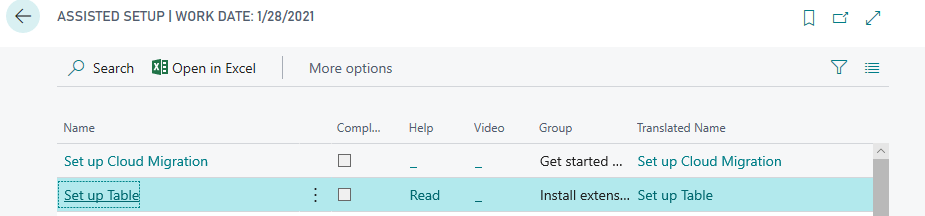
Publish the extension and you will see following result.

Hope this will help you….

Business Central :How to Customize Base App

This blog explains how to customize the base app of business central (old fashion) .

Please Don’t customize the base app, Use extension wherever possible

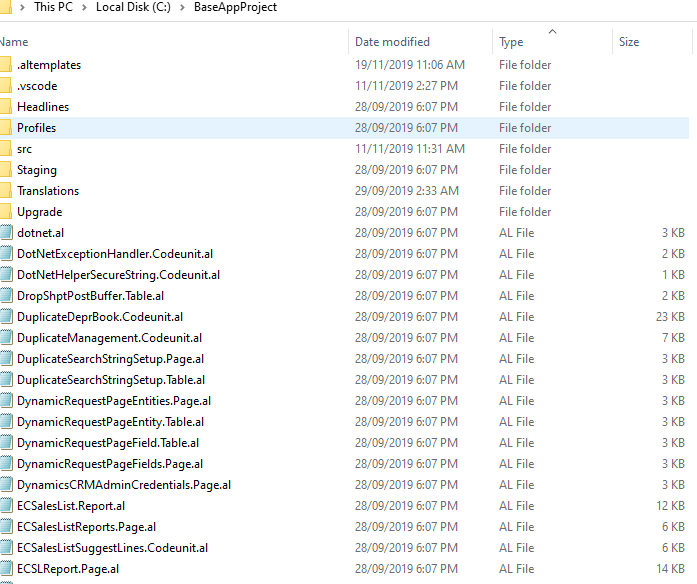
Step 1 :- Copy Base Application from installer

Step 2 :- Unzip in designated folder .This contains app.json file where in target set to onprem

app.json will look like this

Step 3 :- Download the symbols

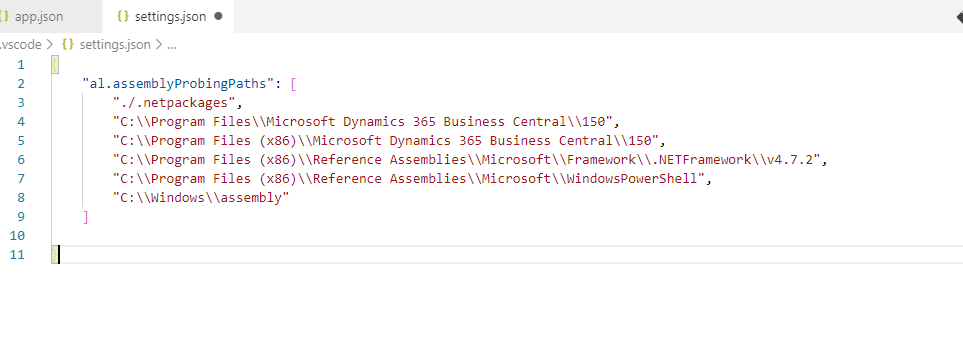
Step 4:- Add the following in either user settings/workspace settings . This is required for .NET DLL used in application

Step 5 :- Unpublish the base application and dependencies or else you will get an error stating that extension already deployed on tenant

Use following PowerShell command

Unpublish-NavApp -Name “Base Application” -ServerInstance BC150

Step 6:- Import license file and publish the modified app.

Hope this will help you.

Cumulative Update Summary November 2019

This image has an empty alt attribute; its file name is updateimage.jpg

Cumulative Update includes all application and platform hotfixes and regulatory features that have been released for Microsoft Dynamics NAV.

Microsoft Business Central Spring CU 6:- BUSINESS CENTRAL CU 6

Microsoft Dynamics NAV 2018 CU 23 :- NAV2018CU23

Microsoft Dynamics NAV 2017 CU 36 :- NAV 2017 CU36

Microsoft Dynamics NAV 2016 CU 49 :- NAV 2016 CU 49

Microsoft Dynamics NAV 2015 CU 61 :-NAV 2015 CU 60

Warning

Before you install a cumulative update in a production environment, take the following precautions:

  1. Test the cumulative update in a non-production environment.
  2. Make a backup of the system or computer where the cumulative update is to be installed.

Stay tuned for more updates…