Cumulative Update includes all application and platform hotfixes and regulatory features that have been released for Microsoft Dynamics Business Central 2019 Wave 2
Update 15.4 for Microsoft Dynamics 365 Business Central 2019 Release Wave 2 :- Business Central CU 15.4
Warning
Before you install a cumulative update in a production environment, take the following precautions:
Test the cumulative update in a non-production environment.
Make a backup of the system or computer where the cumulative update is to be installed.
Cumulative Update includes all application and platform hotfixes and regulatory features that have been released for Microsoft Dynamics Business Central Wave 2 2019 Release
One of nice feature of business central for opening balance.
This will help one to have readymade template of opening balance with ledger account where in one can key in amount and post or even export in excel and after key in values import back to Business Central and post
Hope this small link will help to prepare opening balance as this gives template with ledger account.
As you aware that with new version of business central comes up breaking changes which actually change the way of writing few points like assisted setup and many more.
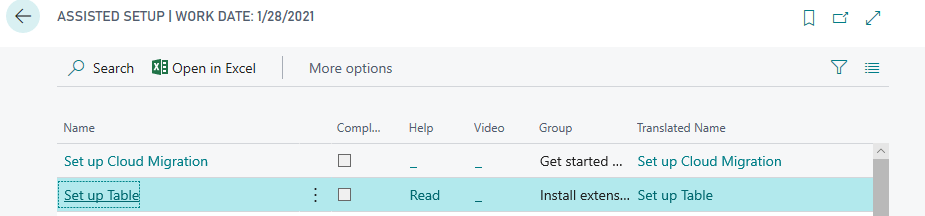
Today we will see how to create assisted setup in wave 2 with new events. In this document have created one of the most simple assisted setup.
Step 3 :- Now use new assisted setup module to create assisted setup as below
codeunit 50100 "SetupTableAssistedSetup"
{

    var
        AssistedSetup: Codeunit "Assisted Setup";
        AssistedSetupGroup: Enum "Assisted Setup Group";
        CurrentGlobalLanguage: Integer;
        SetupWizardTxt: Label 'Set up Table';
        SetupWizardLinkTxt: Label 'https://google.com', Locked = true;

        AlreadySetUpQst: Label 'Setup is already set up. To change settings for it, go to the setup again.Do you want go there now ?';

    [EventSubscriber(ObjectType::Codeunit, Codeunit::"Assisted Setup", 'OnRegister', '', false, false)]
    local procedure SetupInitialize()

    begin
        CurrentGlobalLanguage := GlobalLanguage();
        AssistedSetup.Add(GetAppId(), PAGE::SetupPage, SetupWizardTxt, AssistedSetupGroup::Extensions, '', SetupWizardLinkTxt);
        GLOBALLANGUAGE(1033);
        AssistedSetup.AddTranslation(GetAppId(), PAGE::SetupPage, 1033, SetupWizardTxt);
        GLOBALLANGUAGE(CurrentGlobalLanguage);
        GetInformationSetupStatus();
    end;

    [EventSubscriber(ObjectType::Codeunit, Codeunit::"Assisted Setup", 'OnReRunOfCompletedSetup', '', false, false)]
    local procedure OnReRunOfCompletedSetup(ExtensionId: Guid; PageID: Integer; var Handled: Boolean)
    begin
        if ExtensionId <> GetAppId() then
            exit;
        case PageID of
            Page::"Assisted Company Setup Wizard":
                begin
                    if Confirm(AlreadySetUpQst, true) then
                        Page.Run(PAGE::SetupPage);
                    Handled := true;
                end;
        end;
    end;

    local procedure GetAppId(): Guid
    var
        Info: ModuleInfo;
        EmptyGuid: Guid;
    begin
        if Info.Id() = EmptyGuid then
            NavApp.GetCurrentModuleInfo(Info);
        exit(Info.Id());
    end;


    local procedure GetInformationSetupStatus()
    var
        SetupTab: Record SetupTable;
    begin
        SetupTab.SetFilter(GroupCode, '<>%1', '');
        If SetupTab.IsEmpty() then
            exit;
        AssistedSetup.Complete(GetAppId(), Page::SetupPage);

    end;
}
Publish the extension and you will see following result.





 Ammolh Saallvi Blog