Spring Release 2019 of business central comes up with new features for creating unique keys
Today we will see how to create unique keys in table
While creating second keys you can add an additional parameters said ‘Unique’. This will not allow duplicate values in the field where unique parameter is mentioned.
Now we will see this validation works on business central. Here we are trying put same description which is throwing error because of unique key.
You can define multiple unique keys in one table.
Points to Remember
Field can have empty value that means empty value is also value.
Now you all are aware the importance of creating views in windows client as it save the time of applying filters on the list of records. You can save the view with required filters and use it for future as it show the required data based on saved filters which improves productivity of users
Today we will see how we can create views in AL language.
Following examples illustrates how to create view from item list where inventory is greater than 10000.
In this example create new profile and added views in item list as below
Even you can apply more filters and order by also. As well as you can modify the page layout for the views as per your requirement
Publish the extension and open the business central web client .From setting change the profile and go to item List.
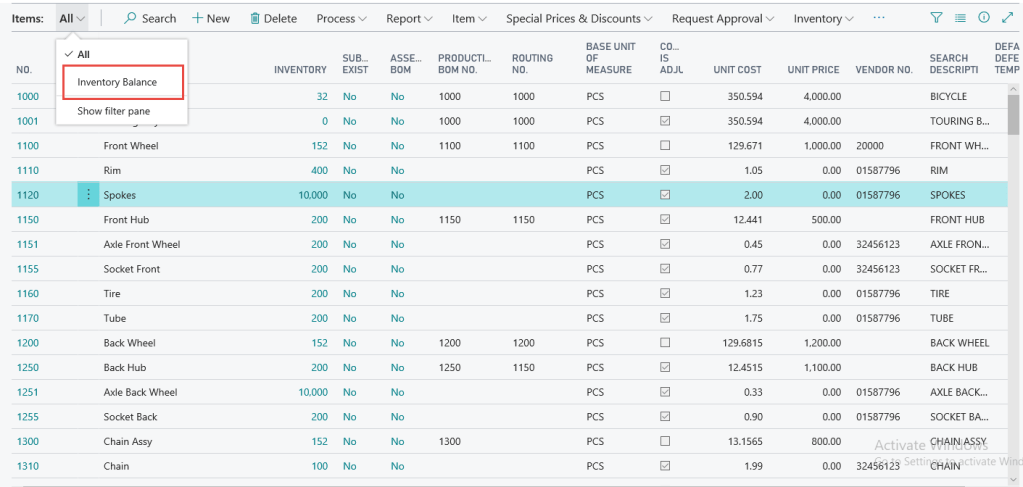
In the above picture you can see views has been added into the item list. Once you click on that view you can see the details as per define in views.
Following points need to remember.
Can not use variables and methods .Can use only table fields
Can not create new page controls from view.
You can modify views from extension or customizations.
Hope you like this way of creating views in business central .Anyhow in upcoming versions there will option available on web client to create views as like windows client.
Till NAV 2018 we have features called as ‘About this page’ which is very useful to analyze the business data or deep insight the table for those fields which are not visible on main page or sub page.
In business central this features replaced with Page Inspection with more features.
How do I enable Page inspection
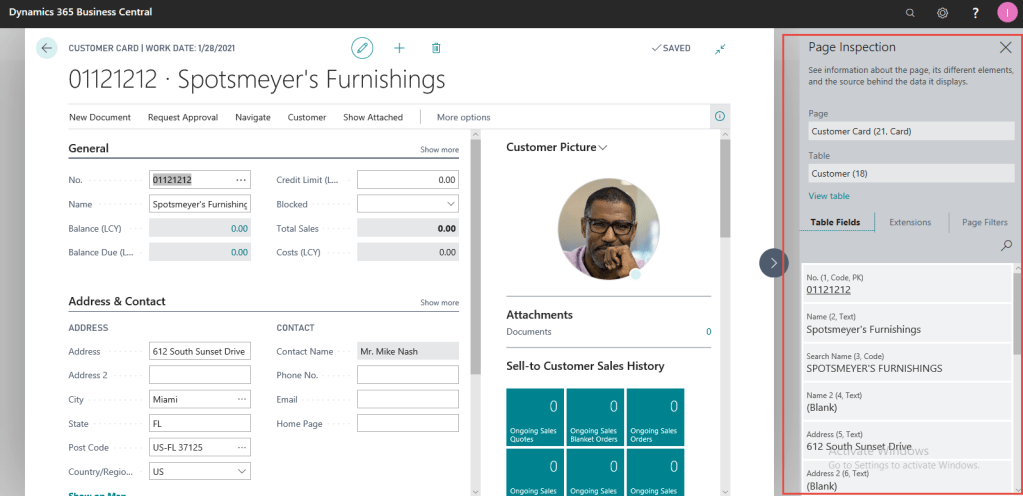
Choosing inspect from top menu or by pressing Ctrl+Alt+F1
You can see box on right size which shows details for current record.




 Ammolh Saallvi Blog