Generate launch.json from the Web Client in Business Central – Wave 1 2025

With the 2025 Wave 1 release of Microsoft Dynamics 365 Business Central, developers get a significant productivity boost: the ability to generate a launch.json file directly from the Web Client! 🎉 This is a feature that eliminates the need to manually configure environment settings in Visual Studio Code (VS Code), especially useful when working across multiple environments or containers.

💡 What is launch.json?

In AL development for Business Central, the launch.json file defines how your AL project connects to your Business Central environment. It includes settings like:

{
  "name": "Your Environment",
  "type": "al",
  "request": "launch",
  "server": "https://your-environment-url",
  "serverInstance": "BC",
  "authentication": "UserPassword",
  "tenant": "your-tenant-id"
}

You can now generate the launch.json configuration directly from the Web Client using just a few clicks. No more copying URLs, figuring out authentication types, or guessing server details.

🔧 Steps to Generate:

  1. Log into your Business Central Web Client.
  2. Navigate to the Help & Support page (? page=134).
  3. Scroll down to the Troubleshooting section.
  4. Look for the new Download launch.json button (or similar option).
  5. Click it – a launch.json file will be downloaded, pre-filled with your current environment’s configuration.

Second option will be navigate Installed extensions and download launch.json

The introduction of the launch.json generation feature in the Business Central Wave 1 2025 web client is a welcome addition for AL developers. It promises to streamline the initial setup process, reduce configuration errors, and enhance overall development efficiency.

Stay tuned fore more.

Cumulative Update for Business Central Wave 1 2020

Cumulative Update includes all application and platform hotfixes and regulatory features that have been released for Microsoft Dynamics Business Central

Business Central Wave 1 2020 (16.2) :- 16.2

Warning

Before you install a cumulative update in a production environment, take the following precautions:

  1. Test the cumulative update in a non-production environment.
  2. Make a backup of the system or computer where the cumulative update is to be installed.

Stay tuned for more updates…

Cumulative Update for Business Central June 2020

Cumulative Update includes all application and platform hotfixes and regulatory features that have been released for Microsoft Dynamics Business Central

Business Central Wave 2 2019 (BC15) :- CU 15.7

Business Central Spring Release (BC14) :- CU13

Warning

Before you install a cumulative update in a production environment, take the following precautions:

  1. Test the cumulative update in a non-production environment.
  2. Make a backup of the system or computer where the cumulative update is to be installed.

Stay tuned for more updates…

How to view database locks in business central

Do you remember this screen from classic client where in we can find who has locked whom.

Once we get blocking id then we try to kill those sessions using sql command .

How to view such detail in business central.

This view detail information like which object id and which function is causing the database locks.

Hope this will help you.

Stay tuned for more updates.

How to View Table data in Business Central

While working in C/AL we have leverage to see the table data from object designer itself but how we can view it from business central.

There are different ways like we can mention the table in launch.json or we can construct the string in web browser to display the details.

Following small video will help you to view from web client itself.

Hope this will help you all..

Stay tuned for more…

Cumulative Update Summary April 2020-Business Central

Cumulative Update includes all application and platform hotfixes and regulatory features that have been released for Microsoft Dynamics Business Central

Business Central 2019 Spring Update CU 11 :- BC 14

Business Central 2019 Fall Release Wave 2 :- BC2019Wave2

Warning

Before you install a cumulative update in a production environment, take the following precautions:

  1. Test the cumulative update in a non-production environment.
  2. Make a backup of the system or computer where the cumulative update is to be installed.

Stay tuned for more updates…

Cumulative Update for Business Central Wave 2

Cumulative Update includes all application and platform hotfixes and regulatory features that have been released for Microsoft Dynamics Business Central Wave 2 2019 Release

Download update from below

Update 15.3 for Microsoft Dynamics 365 Business Central 2019 Release Wave 2

Warning

Before you install a cumulative update in a production environment, take the following precautions:

  1. Test the cumulative update in a non-production environment.
  2. Make a backup of the system or computer where the cumulative update is to be installed.

Stay tuned for more updates…

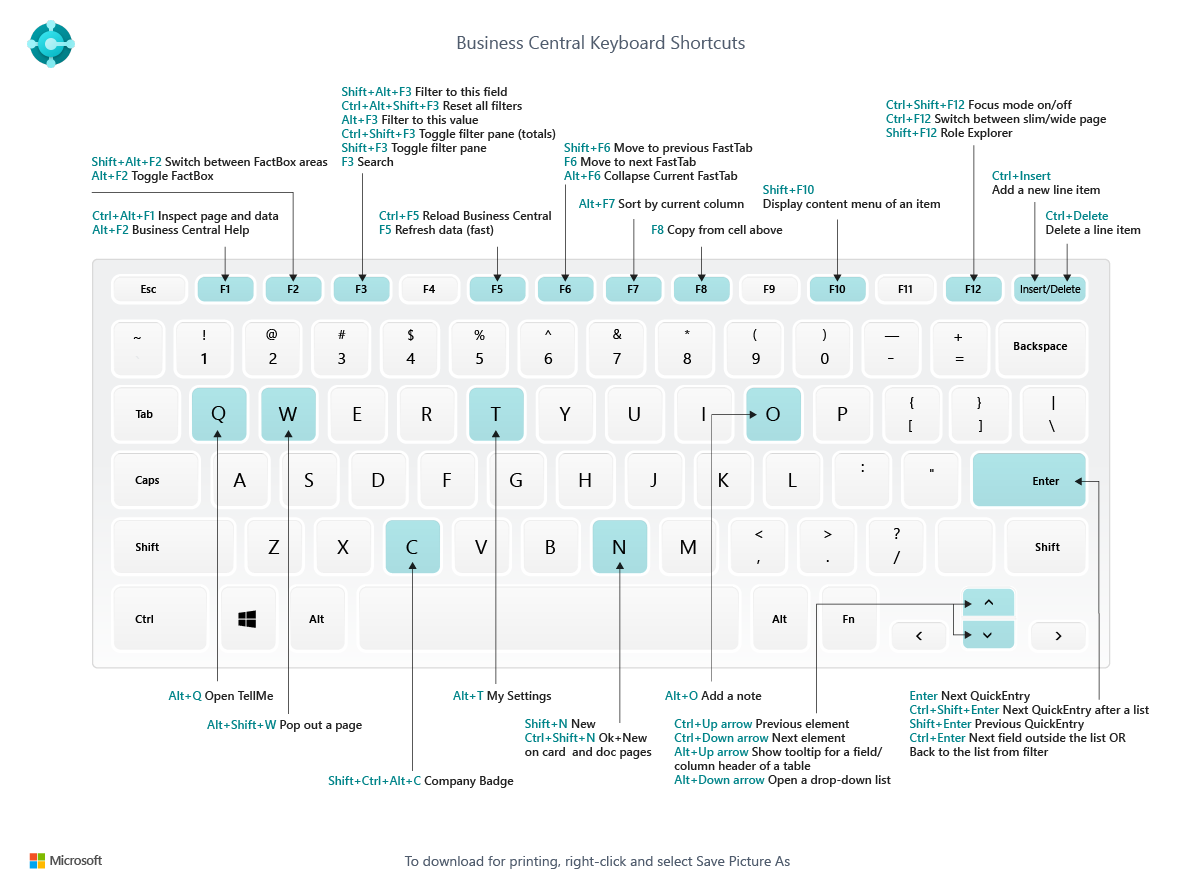
Keyboard Shortcut :- Business Central & VS Code

For my previous contribution on business central please visit this link

This blog contains keyboard shortcut for business central and VS code while will make our life easier while navigating and developing business central extension aka app.

Hope this will help you…

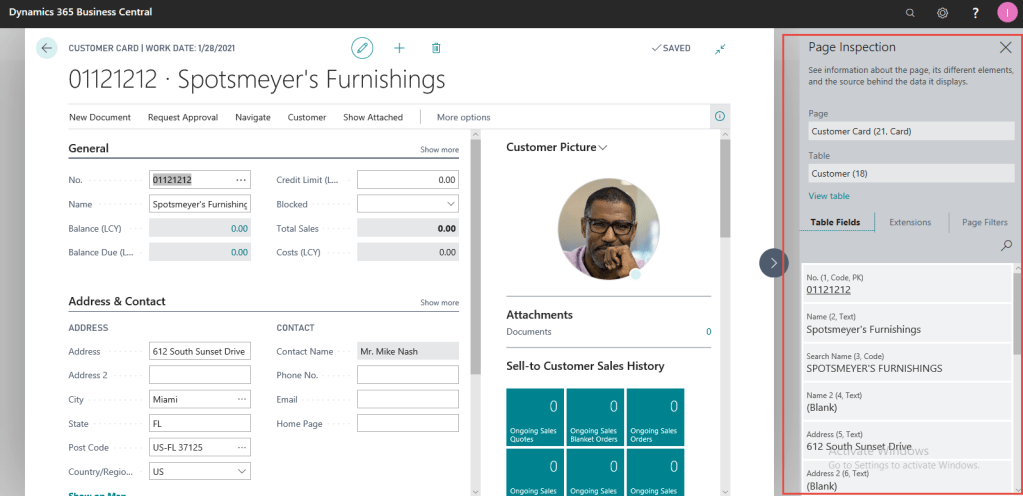
Page Inspection in Business Central

Till NAV 2018 we have features called as ‘About this page’ which is very useful to analyze the business data or deep insight the table for those fields which are not visible on main page or sub page.

In business central this features replaced with Page Inspection with more features.

How do I enable Page inspection

Choosing inspect from top menu or by pressing Ctrl+Alt+F1

You can see box on right size which shows details for current record.

Top Features

  1. Page name with id
  2. Table Name with id
  3. All table fields
  4. Extension name which extend this page
  5. Applied Filters.

Stay tuned for more

Business Central 2019 Spring Release Available to Download

While Directions Asia 2019 getting wrap up we have spring release of Business Central available to download

You can download from following links

Microsoft Business Central Spring 2019 Release

Lets try and blog about new features

Cheers