How to get insights for Error Message in business central

With the release of Business Central Wave 2 2021 aka BCV19 lot of new features has been added to make life easier of developer and/or customers.

Whenever there is an error from application and if we need to have help from partner or MS then we need to have detailed information about that error and prior to BC V19 we need to collect those information from different sources.

In BC V19 now we have detailed information regarding the error pops up on application.

To test this new feature build one action button as below

Once I click on this I got an error message as below

Now this error message can be expanded to see more details.
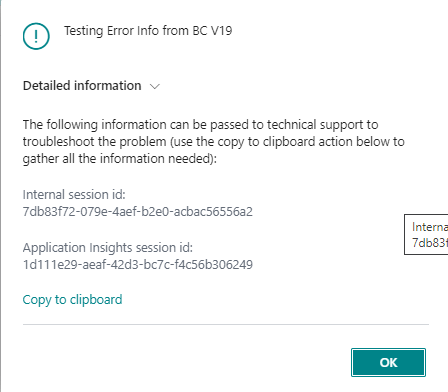
If you look at the above error message it provide technical information such as session id and Error description.

There is one more option is provided on that page is Copy to clipboard and once you click on that it will give more information of that error message as below.

Testing Error Info from BC V19

Internal session id: 
7db83f72-079e-4aef-b2e0-acbac56556a2

Application Insights session id: 
1d111e29-aeaf-42d3-bc7c-f4c56b306249

Client activity id: 
d5ae47d2-2582-46e1-bcd0-8aab7ffd0223

Timestamp: 
2021-10-05T02:57:39.9079548Z

AL call stack: 
DataErrorTest(PageExtension 50101)."ErrorDetail - OnAction"(Trigger) line 2 - ALProject2 by Default publisher

In copied message it provide more information line AL Call stack, Timestamp etc. Basically I like the feature of showing AL call stack which will helpful to trace the exact location from errors is pops up.

This feature is not available for error message showing by using TestField function

Hope this will help

Stay tuned for more.

How to Force Sync extension of customer specific environment in business central

With the release of Business Central Wave 2 2021 aka BCV19 lot of new features has been added to make life easier of developer and/or customers.

Till business central version V18 we are mentioning schemaUpdateMode in launch.json to specify how the data in app should behave when extension is published. In this property we were mentioning

  1. ForceSync
  2. Recreate
  3. Synchronize (This is default value ).

As well as this schema update is used for testing and development and should not be used in production environment as it can disturb your data if the obsolete field is not properly handled.

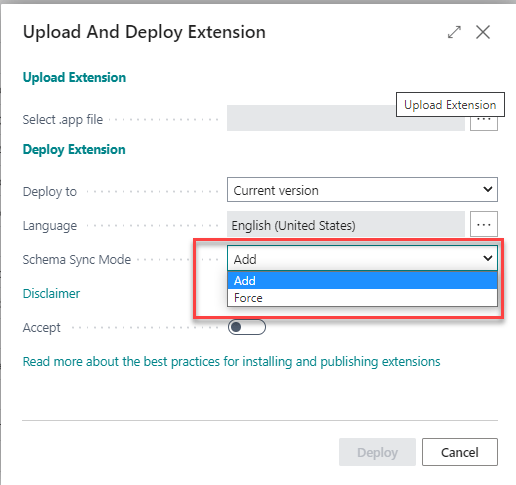
With the new version of business central new option added as below to sync the schema as below.

  1. Add :- The add option will warn you if schemas are incompatible and will not apply the changes.
  2. Force :- Force sync will overwrite the current schema with the new version without warning. Force sync can lead the data loss.

Please carefully use these options it can lead the data loss and without testing on sandbox don’t apply on production environment.

Hopefully you will find this usefule.

Stay tuned for more.

How to allow your app to debug in business central

With the release of Business Central Wave 2 2021 aka BCV19 new version of AL language is also published.

Do you remember this post where in I explain the use of showmycode property from app.json file. With this property we have only one option either we allowed to debug and download your app or vice versa.

Now with new version of AL language this property has been deprecated and new property has been introduced resourceExposurePolicy where in we get leverage to control your app from debug ,download the app file.

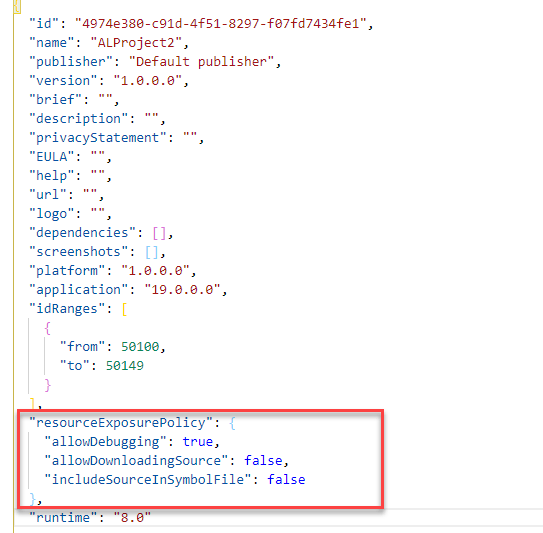
This property will be automatically added when new project is created as below.

If you can see in this property we have three options which can be used to control the app and your IP.

  1. AllowDebugging :- Allow to control the debugging of your app when it is published. The default setting is true.
  2. AllowDownloadingSource :- Allow to control the download of your app source code .The default setting is false.
  3. IncludeSourceInSymbolFile: Allow to control symbol to be included in the source code of package. The default setting is false.

Can I add resourceExposurePolicy and showmycode property together ?

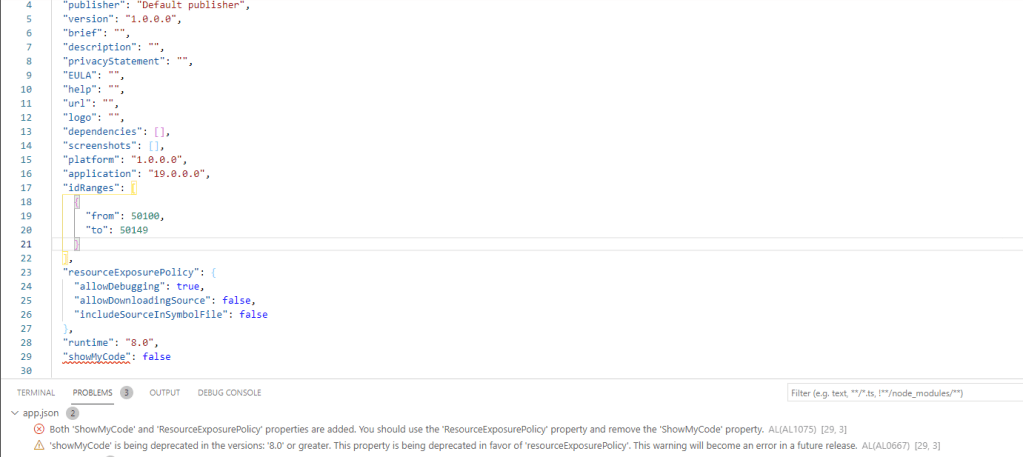
With the introduction of this new property in app.json file we can not use showmycode property as it will show an error and warning as below.

Hopefully this will help us to control our IP and provide more security on our app.

Stay tuned for more.

Microsoft Business Central 2021 Wave 2 released

Microsoft releases business central 2021 Wave 2 (BC 19) on 1st October 2021 .

This version is available on

  1. Cloud
  2. On Docker
  3. On Premise

To check I tried to create new sandbox on cloud environment and it is readily available on my region too,.

Apart from this to get more detail and understanding on new version Microsoft already scheduled a launch event with breakout session .You can register here Business Central Launch Event

For On premise version you can download from following link

Business central On-Premise Version Download

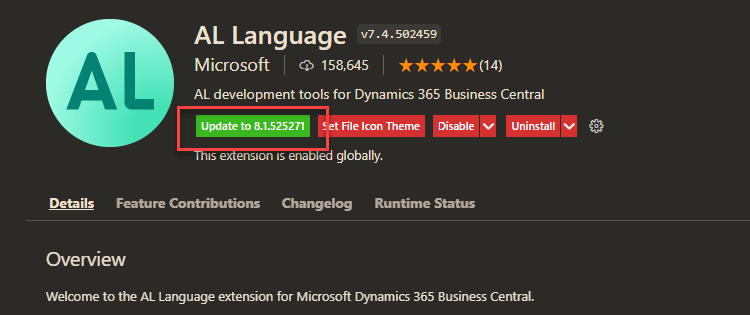
New Version for AL language also available to update.

Stay turned for more updates and keep exploring..