While Directions Asia 2019 getting wrap up we have spring release of Business Central available to download
You can download from following links
Microsoft Business Central Spring 2019 Release
Lets try and blog about new features
Cheers

While Directions Asia 2019 getting wrap up we have spring release of Business Central available to download
You can download from following links
Microsoft Business Central Spring 2019 Release
Lets try and blog about new features
Cheers


As you all are aware the importance of having prefix and suffix in your app. In every extension you design need must have prefix or suffix on objects which include Table Extension, Page extension as well as control parts on pages. Benefits of this is that it will avoid collision of fields between two app which customer would like to install.
As a partner you need to register the prefix or suffix by sending email on d365val@microsoft.com. This will helpful when conflict arise so whosever registered will win.
Now when you convert the app from C/AL to AL then you need to huge task to us Prefix or Suffix in entire project.
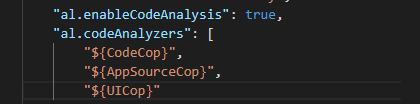
To find all missing Prefix/Suffix you can enable AppSourceCoup which will help every time.
How to enable AppsourceCoup and complete ruleset You can visit https://amolsalvi.blog/2019/01/31/code-analysis-ruleset-business-central/
Apart from this you can create json file and mention the required prefix or suffix value as below
{ "mandatoryPrefix": "ABCD" }
Hope this will help …

A code analyzer is a library that builds on the compiler’s functionality to offer enhanced analysis of the syntax and semantics of your code at build time
CodeCop is an analyzer that enforces the official AL Coding Guidelines
PerTenantExtensionCop is an analyzer that enforces rules that must be respected by extensions meant to be installed for individual tenants
AppSourceCop is an analyzer that enforces rules that must be respected by extensions meant to be published to Microsoft AppSource
UserInterfaceCop is an analyzer that enforces rules that must be respected by extensions meant to be installed for individual tenants
To enable following rules we can use Code Analysis tools

Following are few rules for every code analysis tool .You can download from following file
Hope this will help you all..

Microsoft releases new release notes for business central .This illustrates planned features for business central.
Major features planned as below
All these features are planned for April and September 2019
To find more information you can visit following link
Stay tuned for more…
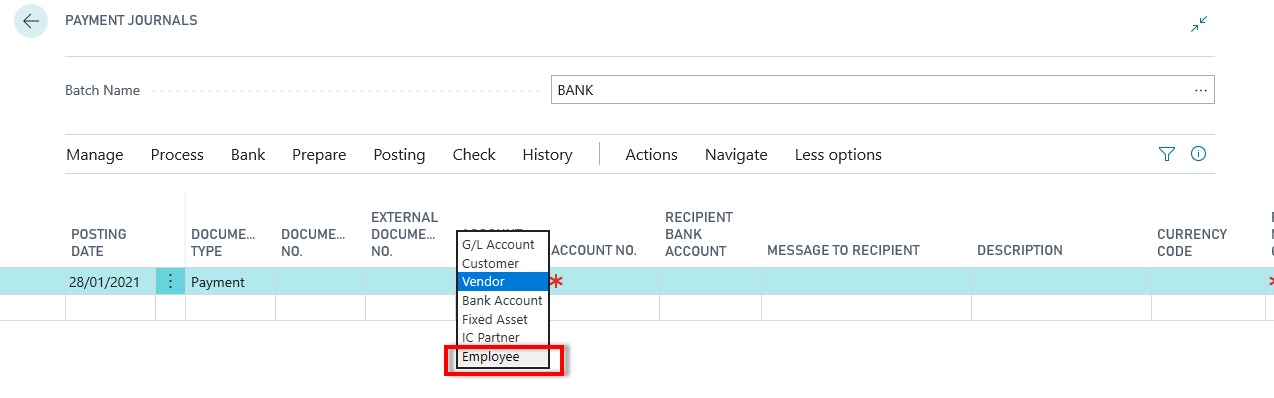
While business central getting updated every day ,today found that new account type has been introduced in journals as ‘Employee‘. Wherein you can select employee from master to make transactions and after post it will maintain separate ledger as employee ledger

Following new tables introduced for setup and ledger entries
| ID | Name |
| 5221 | Employee Posting Group |
| 5222 | Employee Ledger Entry |
| 5223 | Detailed Employee Ledger Entry |
| 5224 | Payable Employee Ledger Entry |
| 5225 | Employee Payment Buffer |
Keep finding and keep learning.

Cumulative Update 03 for Microsoft Dynamics 365 business central on-premises released
Download from following link
Microsoft 365 Business Central :- Business Central CU03
This cumulative update includes all hotfixes and regulatory features that have been released for Microsoft Dynamics 365 Business Central, including hotfixes and regulatory features that were released in previous cumulative updates.
This cumulative update replaces previously released cumulative updates. You should always install the latest cumulative update.

Cumulative Update 02 for Microsoft Dynamics 365 business central on-premises released
Download from following link
Microsoft 365 Business Central :- Business Central CU02
This cumulative update includes all hotfixes and regulatory features that have been released for Microsoft Dynamics 365 Business Central, including hotfixes and regulatory features that were released in previous cumulative updates.
This cumulative update replaces previously released cumulative updates. You should always install the latest cumulative update.

Here are steps to upgrade to Business central .This is old way that is merging the objects into standard objects . Anyway not recommended to do this and it is better to create extension and publish it
Listed here some of the steps to upgrade business central from NAV 2018

NAV TechDays is the name of a conference, organized by mibuso.com. This conference meant technical only and highly relevant – sessions, related NAV and Business Central.
NAV TechDays is the place where some of the best developers and MVP’s exchange ideas and provides more insight of NAV world (oops Business Central)
Few of the session which I think more useful for everybody which listed here on my blog and you can visit them
Practical approaches for upgrading your NAV database and moving to extensions
The future for developers and consultants
Performance: Business Central reloaded for the Cloud
What’s new in Developing for Business Central
Evolution of a titan: a look at the development of NAV from an MVP angle
Business Central: The new face of the client
Crazy mix of integrations: Dynamics 365 Business Central and Azure services
Hope you guys will find it useful