How to Extend Preview Posting in business central

Do you know one of the great feature provided by Navision called as Preview posting.

When posting journals or documents with a large number of entries, accountants want to make sure that the posting will be correct beforehand. Previewing the posting helps prevent the need for corrections, making accountants more productive.

In upcoming version of Business Central Wave 2 2021 preview posting is extended to show more details and it is also setup based.

To setup the preview posting navigate to General Ledger Setup

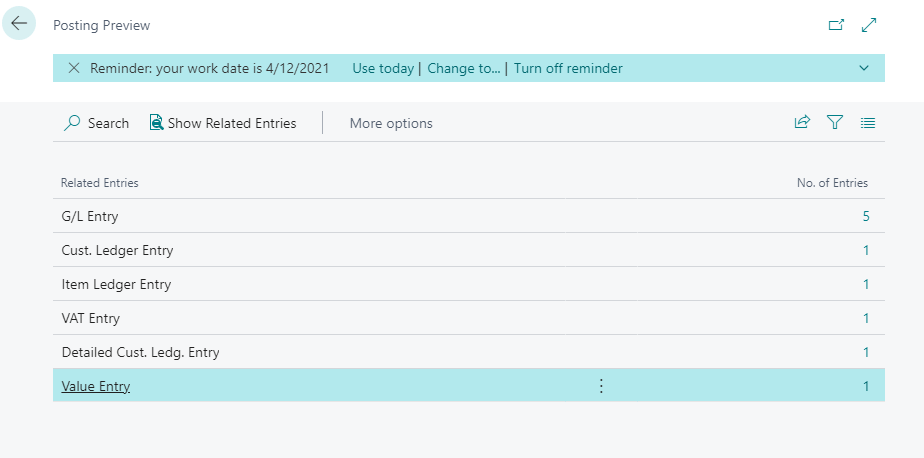
If Posting preview type is selected as standard then it gives an overview of entries group by type.

Posting Preview type :- Standard

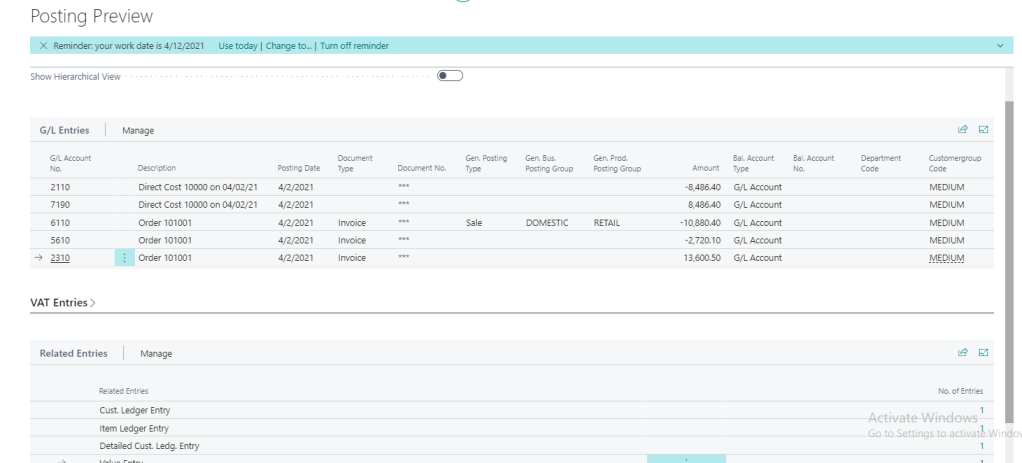
Posting preview type :- Extended

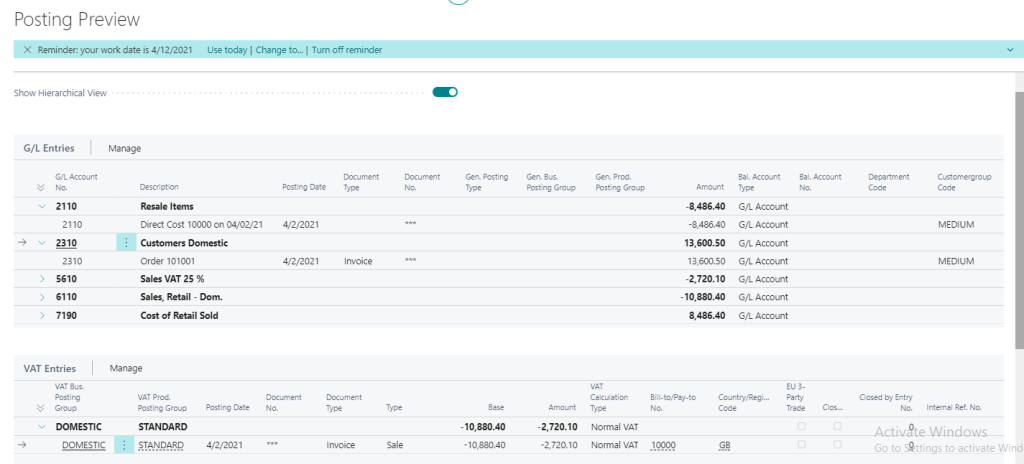
In the above screenshot one more option provided to see the Hierarchical View

After selecting the option Show Hierarchical View

Hopefully this feature will help accountant

Stay tuned for more.

How to Setup default document line type for Sales transaction in business central

This is one of new feature going to be in October release of Business central.

On Sales transaction user need to select the line type such as Item, G/L Account ,Fixed asset etc. but sometime users says can we have default type as Item on every new sales orders rather than selection .

With upcoming business central version it is possible to set default line type as setup.

Go to Sales & receivables setup and select document Default line type as below

Select the desire value from dropdown list and go to sales order to create new transaction.

May be this small change will make difference for end users

Stay tuned for more features for upcoming versions.

What is planned for Business Central Wave 2 2021 release

As we are gearing up for new release of business central and already the buzz is started for new version . Here I will list few upcoming features which I am looking forward in new version.

Following features I am looking forward.

Richer access control for extension source in cloud environments

Add additional columns through personalization in various pages to gain more insight

List of trusted partner apps

Profiling AL performance with snapshot debugger

Transactional installation and sync of extensions on-premises

Restarting environments

Unhindered data entry across rows

Decimal separator on numeric keypad matches region setting

Discovering reports and administration areas in Role Explorer

Copying environments of different types

Do let me know yours…

How to execute mathematical function in business central

Are you looking for for running some mathematical function in business central then may be this blog post is interesting for you.

In business central new system code unit is provided to execute some important mathematical function.

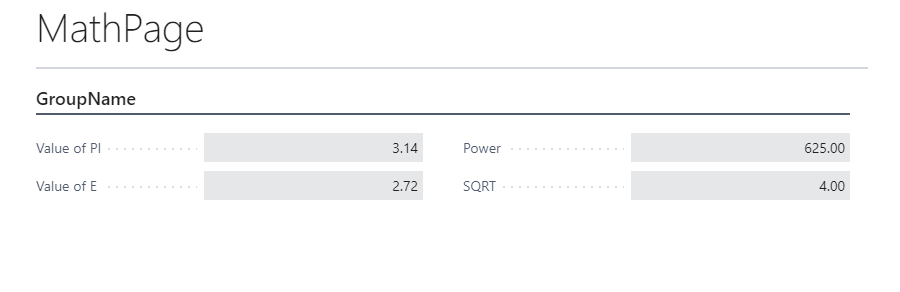
Build one simple page to show few expressions as below

One can determine following values from this codeunit.

MethodRemarks
PiReturns the value of pi.
EReturns the value of E.
Abs Returns the absolute value of a Decimal number.
AcosReturns the angle whose cosine is the specified number.
AsinReturns the angle whose sine is the specified number.
AtanReturns the angle whose tangent is the specified number.
PowReturns a specified number raised to the specified power.
SQRTReturns the square root of a specified number.
FloorReturns the largest integral value less than or equal to the specified decimal number.
ExpReturns e raised to the specified power.
CeilingReturns the smallest integral value that is greater than or equal to the specified decimal number.

Hopefully you find this helpful to you.

Stay tuned for more updates.

How to add keys in Base table of Business Central

With the release of Wave 1 2021 lot of new feature introduced . One of the new feature is that partners now can add keys in base table with customized field which was not possible earlier

Today we will see how we can do that

First Lets see what is happening is earlier version of business central. In earlier version we can only add the keys with the field added on table extension and we are not able to see the field available in base table for adding in keys

Look at the following example as I created one simple extension in V17 and trying to add key

Now when I try to add the keys in this table extension it will populate only those fields which are added in table extension

In New version of Business central i.e. Wave 1 2021 we can Add more keys with base table fields and use to improve the performance while retrieving or updating records

Now look at the following example for new version .Just created a simple table extension

Now when I try to add the keys in this table extension it will populate all the fields available in base table as below

So that means we can create keys with

  1. Fields from base table
  2. Fields from table extension

Can I create combination of fields from base table and fields from table extension ?

And the obvious answer is no and reasons are simple that both base table and table extension are two different tables in Sql server.

I hope you will find this information useful

So stay tuned for more updates.

Cheers.

Microsoft Dynamics 365 Business Central 2021 Virtual Event

Get Ready for yet another virtual launch of business central Wave 1 2021 and it is streamed on 13th April 2021

Image

This will a free virtual event for everyone from reselling partners, consultants, and ISV partners.

You can join from following link

https://events1.social27.com/msdyn365bclaunchevent2021w1/auth/register

Lets drive more deep in Business central with this event and don’t forget to get you system check specially for internet.

Cheers..

How to restore environment in business central

Have you guys remember my tweet regarding the restoration of environment .Following is the tweet

If you still not follow me on then please follow me on twitter for more updates

So in month of November 2020 I faced this problem as due to some issue production environment got hanged and user abruptly close the session .Post that data in some tables got messy and couldn’t recover in time and then I need to contact MS guys to restore environment which took almost a week and till that time customer transaction got halted. That time question came to my mind how customer will handle all these things by going forward and MS guy responded me that time that this feature is going to added in Admin center in upcoming release.

Now with released of Business central 17.3 this feature become reality .It is still in preview mode.

Lets look at how to restore the environment

To restore environment you need to have access to admin center.

  1. Go to Admin center.
  2. Select Environment

3. Click on Restore

4. In the restore environment window select date and time to which you want to restore the environment.

5. Select the type of environment such as sandbox or production.

6. Finally Name for restored environment.

7. Hit the restore

Important points

  1. Backups are available for past 30 days
  2.  The number of restore attempts will be limited to 10 attempts per environment/per month.
  3. The recovery is allowed within a maximum of three immediately preceding versions of Business Central (including minor and major updates), but still within a maximum of 30 days (from the point of the environment creation)

Hope this will help you.

Stay tune for more.

Upcoming New Features with Business Central

Recently Microsoft releases plan for major version of Microsoft Dynamics 365. This blog post actually focused on those features which I am looking forward to and may be every one in community.

Lets Start

Partners can add keys to base tables and table extension

Does anybody remembered this points which I raised in year 2017 on GitHub and finally this is going to add in April 2021 and I am looking forward to it as it is not supported and I have restructure the app.

Report Extensibility

This feature is everybody awaiting because if we need to change in any base app report then we need to copy that report ,make changes and use report substitution to display the customize report. Looking forward for new report extension object where in one can change layout and dataset.

Dimension Correction

In Year 2016 I wrote this blog post for updating the dimension and not it is going to be add as feature in Business central. This will help end users for updating the incorrect dimensions.

Above all it from April 2021 onwards Business Central will be available in India

Apart from above lot of new features are added in upcoming version of business central

Administration

Improve the reliability of the database export operation for larger databases with more companies

Improvements for the Delegated Administrators

Reassign an environment from one Azure Active Directory organization to another (through Microsoft Support)

Application

Assisted setup helps move the task of adjusting item costs to the background

Automatic creation of lot and serial number information cards

Bank reconciliation improvements

Changes in synchronization between contact and customer

Define lot sizes for various stages of production

More control over settings for default dimensions

Payment reconciliation journal improvements

Simplified bank statement file import

Better with Microsoft 365

Look up Business Central contacts from within Microsoft Teams

Enablement of Word merge in Business Central

Support cloud printing using Microsoft Universal Print


Modern development tools

Extension validation on upgrade

Interface – obsolete support

Return record link instead of name when using lookups

For more information please visit here on official sites of Microsoft

Stay tuned for more updates.

How to kill session in Business Central

Recently faced a problem of table locking which goes in not responding stage and finally user close the tab ,but when user opens the session again it actually messed up the critical data (It seems unimaginable force was roaming that time when this happens). Eventually after trying couple of days for data correction I need to contact Microsoft to restore the database.

When this happening my customer asked me if something like this happen then can we kill or cancel the session of user and then I came across this feature of Business Central admin center.

How to access admin center

This can be by adding tenant id with your business central URL as below

https://businesscentral.dynamics.com/%5BTenant Id]

This will open admin center as below.

In this portal you can see all the environment including sandbox.I can see this is your control center for managing business central on cloud.

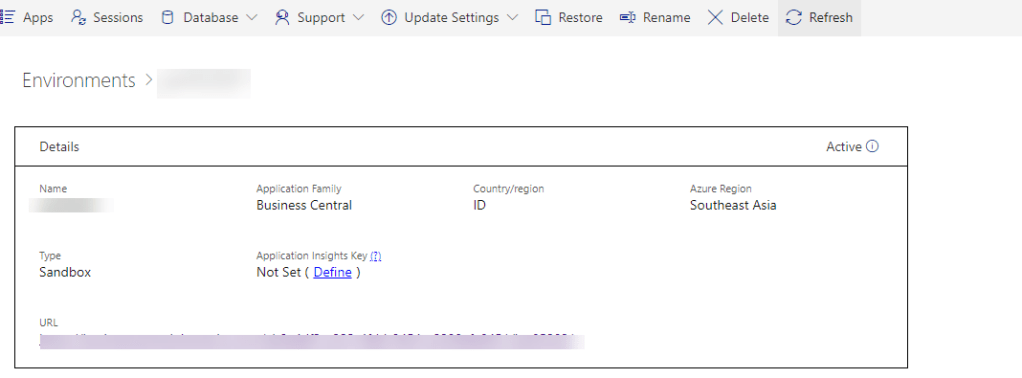
Now next step is click on required environment which will navigate to other screen.

To see all the session click on session

This will show you call the required session for the selected environment.

Now to cancel the session select the required session and click on Cancel session .This will kill the required session.

Another advantage of this screen is that it show other information like which operation is going on ,which object is involved in current operation and duration of current operation.

Hope this will help you to cancel the unwanted session

Stay tuned for more..

How to check financial journals in background in business central

With the release of Business Central Wave 1 2020  new feature added to check validation in background for financial journals

As of now this feature is need to enabled from Feature management

This features will helpful to financial users to check the issue before posting. Before this feature we have Test Report and Preview Posting to check the issues before posting. Advantage of this feature is that this feature is can be enabled for specific batch .

To enable this feature on batch go to General Journal batch and enabled this feature for required batch.

Once this will enabled on batch this will show journal check on journal screen as follows

Enter the transaction in journal and if entry is erroneous then it will show the error as below

For more details of the error you can click Issues total to see the details of issues

Even this factbox shows the the lines which shows which lines are correct and incorrect.

Hoe this will help you to deal with financial journals validation.

Apart from this you can check financial features Copy journal lines to posted.

Stay tuned for more.